IE 8 continues to defy pupolar JavaScript functions in Firefox and Chrome, for window/document measurements.
The equivalent of window.innerWidth/Height in IE is document.documentElement.clientWidth/Height.
Following codes can be used:
; var horizonPosi = (window.innerWidth) ? window.innerWidth : document.documentElement.clientWidth
; var verticalPosi = (window.innerHeight) ? window.innerHeight : document.documentElement.clientHeight
There are other functions such as document.body.clientWidth/Height, document.body.offsetWidth/Height, but none of them are the equavalent. There is also a special case for document.body.clientHeight: it does not work while document.body.clientWidth works fine.
Showing posts with label ie. Show all posts
Showing posts with label ie. Show all posts

Invalid Argument Error in IE
Sometime you will get Error: Invalid argument in IE. No more other information. And this script runs well in Firefox and Chrome. Indeed, this error message tells true the argument is invalid. However, the problem is not when argument being used, but lies on when you get this argument. In one case:
1 ; var horizonPosi = (window.innerWidth/2 - 50) + 'px'
2 ; headerPainting.style.left = horizonPosi
the problem actually is caused by window.innerWidth. When print out, the argument as horizonPosi is indeed "NaNpx".
1 ; var horizonPosi = (window.innerWidth/2 - 50) + 'px'
2 ; headerPainting.style.left = horizonPosi
the problem actually is caused by window.innerWidth. When print out, the argument as horizonPosi is indeed "NaNpx".
Are “Title” and "Top" Keywords in JavaScript?
No, actually they is not. However, please do not use them as name or id in HTML. Following problem has been notices:
‹input id=”title” type=”text” value”Title is forbidden” ›
When try to get value by document.getElementById('title').value, it generate null in IE. If one exchanges the “title” with other word, it works fine.
In Chrome, one case use top() as function name, it does not work while it works fine with IE and Firefox.
Very special!
http://aptana.com/reference/html/api/JSKeywords.index.html
‹input id=”title” type=”text” value”Title is forbidden” ›
When try to get value by document.getElementById('title').value, it generate null in IE. If one exchanges the “title” with other word, it works fine.
In Chrome, one case use top() as function name, it does not work while it works fine with IE and Firefox.
Very special!
http://aptana.com/reference/html/api/JSKeywords.index.html
iFrame Height Issue
Changing height of iFrame from JavaScript function becomes painful task in new versions of both IE and Firefox. However, if one uses iFrame, adjusting its height to fit its contents is essential. The problem is the height of content is unknown when dramatic feeding required. The “orthodox” method to accomplish this task is to open iFrame with any height first, then adjust it on onLoad event. Width is less painful because for those iFrame to fit complete screen width, width=“100%” can be defined when iFrame is defined.
Basic idea of this “orthodox” approach includes two steps, detect the correct height and resize to it.
Detecting methods include:
- document.documentElement.clientHeight
- contentWindow.document.body.scrollHeight
Resize method is:
- document.getElementById('myIframe').style.height = newHeight
Basically, this approach does not work. There are several problems around it, such as assignment to .style.height does not work in Firefox. More serious problem is contentWindow.document.body.scrollHeight will return permission denial error message if host page and iFrame content page are not in the same domain; more precisely, the scheme, hostname and port match.
Another approach is to find the correct height before opening the iFrame. It is hard to detect the height of page to be inside of iFrame. However, since iFrame can have its own scroll bar, it may not be necessary to detect content’s height. The best approach might be to find available screen height of user after your title head. Following methods have been tested in Firefox and IE:
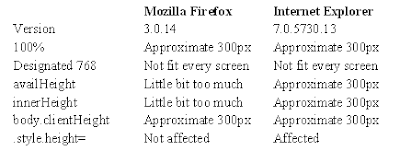
It appears Internet Explorer does not response to any of detections.
Following is the codes to apply this approach:
Codes in head:
‹script type="text/javascript"›
var url = "http://www.google.com/" // URL for your iFrame.
var titleHeight = 240;
var frameHeight = Math.max((screen.availHeight ? (screen.availHeight-titleHeight) : (window.innerHeight ? (window.innerHeight-titleHeight) : document.body.clientHeight)), 768);
window.document.onload = function {document.getElementById('linkIframe').style.height = frameHeight};
‹/script›
Codes in body:
‹script type="text/javascript"›
document.write('‹iframe id="linkIframe" width="100%" height="' + frameHeight + '" src="' + url + '" name="content"›‹/iframe›');
‹/script›
Basic idea of this “orthodox” approach includes two steps, detect the correct height and resize to it.
Detecting methods include:
- document.documentElement.clientHeight
- contentWindow.document.body.scrollHeight
Resize method is:
- document.getElementById('myIframe').style.height = newHeight
Basically, this approach does not work. There are several problems around it, such as assignment to .style.height does not work in Firefox. More serious problem is contentWindow.document.body.scrollHeight will return permission denial error message if host page and iFrame content page are not in the same domain; more precisely, the scheme, hostname and port match.
Another approach is to find the correct height before opening the iFrame. It is hard to detect the height of page to be inside of iFrame. However, since iFrame can have its own scroll bar, it may not be necessary to detect content’s height. The best approach might be to find available screen height of user after your title head. Following methods have been tested in Firefox and IE:

It appears Internet Explorer does not response to any of detections.
Following is the codes to apply this approach:
Codes in head:
‹script type="text/javascript"›
var url = "http://www.google.com/" // URL for your iFrame.
var titleHeight = 240;
var frameHeight = Math.max((screen.availHeight ? (screen.availHeight-titleHeight) : (window.innerHeight ? (window.innerHeight-titleHeight) : document.body.clientHeight)), 768);
window.document.onload = function {document.getElementById('linkIframe').style.height = frameHeight};
‹/script›
Codes in body:
‹script type="text/javascript"›
document.write('‹iframe id="linkIframe" width="100%" height="' + frameHeight + '" src="' + url + '" name="content"›‹/iframe›');
‹/script›
First Beta Version of Koncord Homepage Is Free to Download
We have prepared a single HTML page which can be used as a Homepage for your browsers. This page consists of popular websites, such as Gmail, Hotmail, etc. Of course, it also has built-in Koncord Private Search Engine.
This homepage is just like favourites in IE and bookmarks in Firefox.
Here is free download site:
Download from Uploading.com
The address is: http://uploading.com/files/7Z17FDD2/Koncord.html.html
This homepage is just like favourites in IE and bookmarks in Firefox.
Here is free download site:
Download from Uploading.com
The address is: http://uploading.com/files/7Z17FDD2/Koncord.html.html
Set Language in Private Search Engine
Our previous posting Create Your Own Search Engine (http://koncordpartners.blogspot.com/2009/07/create-your-own-search-engine.html) could only display search results in English. Actually, the codes in that posting only have 4 parameters, you can add much more to suit your own needs. These 4 Google WebSearch Query Parameters are:
cx - Required. The cx parameter specifies a unique code that identifies a custom search engine. You must specify a Custom Search Engine using the cx parameter to retrieve search results from that CSE.
ie - Optional. The ie parameter sets the character encoding scheme that should be used to interpret the query string. The default ie value is latin1.
q - Optional. The q parameter specifies the search query entered by the user. Even though this parameter is optional, you must specify a value for at least one of the query parameters (as_epq, as_lq, as_oq, as_q, as_rq) to get search results.
sa - Required. It is indeed you submit the search query to Google search engine.
Today, we add three more parameters to show how the Simplified Chinese and Traditional Chinese can be interchangeable as search result.
hl - Optional. The hl parameter specifies the interface language (host language) of your user interface. To improve the performance and the quality of your search results, you are strongly encouraged to set this parameter explicitly. However, a successful search engine does not rely only on the parameters, but also settings of search engine itself. That is why you may also need your own account. “Site language”, is not only the site language, but also the search engine host language (the display language other than search result). Naturally, it should be set as English. “Your site encoding”, which is the searching language, should be GB18030 in this example.
lr - Optional. The lr (language restrict) parameter restricts search results to documents written in a particular language. Google WebSearch determines the language of a document by analyzing:
- the top-level domain (TLD) of the document's URL
- language meta tags within the document
- the primary language used in the body text of the document
c2coff - Optional. The c2coff parameter enables or disables the Simplified and Traditional Chinese Search feature. Please note, this parameter is only related to Chinese. For other language, no need to use this. The default value for this parameter is "0" (zero), meaning that the feature is enabled. Values for the c2coff parameter are: 1 is disabled, and 0 is enabled.
Following is codes with these two parameters. It means the search will be restricted to only websites wrote in three languages: US English, Simplified Chinese and Traditional Chinese.
<!DOCTYPE html PUBLIC "-//W3C//DTD XHTML 1.0 Transitional//EN" "http://www.w3.org/TR/xhtml1/DTD/xhtml1-transitional.dtd">
<html xmlns="http://www.w3.org/1999/xhtml" xml:lang="en">
<head>
<title>
This is private search engine using Google facility
</title>
</head>
<body>
</br>
</br>
</br>
</br>
</br>
</br>
</br>
</br>
<form id="cse-search-box" action="http://www.google.com/cse">
<input type="hidden" value="partner-pub-3597878264183301:140hrt-vklq" name="cx">
<input type="hidden" value="GB18030" name="ie">
<input type="hidden" value="lang_en|lang_zh-Hans|lang_zh-Hant" name="lr">
<input type="hidden" value="0" name="c2coff">
<p align="center">
<img alt="Google" src="http://www.google.com/intl/en_us/images/logo.gif" />
</p>
<p align="center">
<input size="50" name="q">
<input type="submit" value="Search" name="sa">
</p>
</form>
<p align="center">
Koncord Private Search Engine Based on New Google Technology
</p>
</body>
</html>
http://www.google.com/coop/docs/cse/resultsxml.html
cx - Required. The cx parameter specifies a unique code that identifies a custom search engine. You must specify a Custom Search Engine using the cx parameter to retrieve search results from that CSE.
ie - Optional. The ie parameter sets the character encoding scheme that should be used to interpret the query string. The default ie value is latin1.
q - Optional. The q parameter specifies the search query entered by the user. Even though this parameter is optional, you must specify a value for at least one of the query parameters (as_epq, as_lq, as_oq, as_q, as_rq) to get search results.
sa - Required. It is indeed you submit the search query to Google search engine.
Today, we add three more parameters to show how the Simplified Chinese and Traditional Chinese can be interchangeable as search result.
hl - Optional. The hl parameter specifies the interface language (host language) of your user interface. To improve the performance and the quality of your search results, you are strongly encouraged to set this parameter explicitly. However, a successful search engine does not rely only on the parameters, but also settings of search engine itself. That is why you may also need your own account. “Site language”, is not only the site language, but also the search engine host language (the display language other than search result). Naturally, it should be set as English. “Your site encoding”, which is the searching language, should be GB18030 in this example.
lr - Optional. The lr (language restrict) parameter restricts search results to documents written in a particular language. Google WebSearch determines the language of a document by analyzing:
- the top-level domain (TLD) of the document's URL
- language meta tags within the document
- the primary language used in the body text of the document
c2coff - Optional. The c2coff parameter enables or disables the Simplified and Traditional Chinese Search feature. Please note, this parameter is only related to Chinese. For other language, no need to use this. The default value for this parameter is "0" (zero), meaning that the feature is enabled. Values for the c2coff parameter are: 1 is disabled, and 0 is enabled.
Following is codes with these two parameters. It means the search will be restricted to only websites wrote in three languages: US English, Simplified Chinese and Traditional Chinese.
<!DOCTYPE html PUBLIC "-//W3C//DTD XHTML 1.0 Transitional//EN" "http://www.w3.org/TR/xhtml1/DTD/xhtml1-transitional.dtd">
<html xmlns="http://www.w3.org/1999/xhtml" xml:lang="en">
<head>
<title>
This is private search engine using Google facility
</title>
</head>
<body>
</br>
</br>
</br>
</br>
</br>
</br>
</br>
</br>
<form id="cse-search-box" action="http://www.google.com/cse">
<input type="hidden" value="partner-pub-3597878264183301:140hrt-vklq" name="cx">
<input type="hidden" value="GB18030" name="ie">
<input type="hidden" value="lang_en|lang_zh-Hans|lang_zh-Hant" name="lr">
<input type="hidden" value="0" name="c2coff">
<p align="center">
<img alt="Google" src="http://www.google.com/intl/en_us/images/logo.gif" />
</p>
<p align="center">
<input size="50" name="q">
<input type="submit" value="Search" name="sa">
</p>
</form>
<p align="center">
Koncord Private Search Engine Based on New Google Technology
</p>
</body>
</html>
http://www.google.com/coop/docs/cse/resultsxml.html
Subscribe to:
Posts (Atom)

 Posts
Posts

