Put following scripts in HTML Head:
‹meta content='DESCRIPTION HERE' name='description'/>
‹meta content='KEYWORDS HERE' name='keywords'/>
‹meta content='AUTHOR NAME HERE' name='author'/>
Keywords need to be separated by comma.
Several people were filling with just the keywords in the description. DON'T DO THAT. Google and other search engines will ban your site from the search engines list if you did so. And also don't repeat the keyword more than 3 times.
http://www.bloggertricks.com/2007/12/adding-meta-tags-to-bloggerblogspot.html
Showing posts with label Google. Show all posts
Showing posts with label Google. Show all posts

A Privacy Issue for Google AdSense
Google AdSense allows readers to gain the Publisher ID through viewing web page's source code in HTML. This may lead to privacy leaking to some degree.
Here is a case to show how people can explore such public available information. Blog site blog.dwnews.com is a popular political forum amongst overseas Chinese communities. The owner of this forum tries to create a forum without bias and welcomes people having different options to debate in the forum. As the result, the debates are always so ferocious between groups of pro-democracy and pro- Chinese Government. In aims to avoid the possible trouble with Chinese Government, many bloggers are anonymous there.
One blogger through Google AdSense' publisher ID found out several popular blogs were actually run by a same person, or presumably the same person because the AdSense Publisher IDs for these blogs are the same. He attached accordingly based on his finding, followed by a series of incidents. At the end of it, one of them declared he leaves the site permanently, and the account of the other one, ranked number one in current activities, had been cancelled by the webmaster. What lucky here is, both of them did not reside in China and we did not see someone ends up in the jail.
That was in June 2009, two months ago.
Here is a case to show how people can explore such public available information. Blog site blog.dwnews.com is a popular political forum amongst overseas Chinese communities. The owner of this forum tries to create a forum without bias and welcomes people having different options to debate in the forum. As the result, the debates are always so ferocious between groups of pro-democracy and pro- Chinese Government. In aims to avoid the possible trouble with Chinese Government, many bloggers are anonymous there.
One blogger through Google AdSense' publisher ID found out several popular blogs were actually run by a same person, or presumably the same person because the AdSense Publisher IDs for these blogs are the same. He attached accordingly based on his finding, followed by a series of incidents. At the end of it, one of them declared he leaves the site permanently, and the account of the other one, ranked number one in current activities, had been cancelled by the webmaster. What lucky here is, both of them did not reside in China and we did not see someone ends up in the jail.
That was in June 2009, two months ago.
Set Language in Private Search Engine
Our previous posting Create Your Own Search Engine (http://koncordpartners.blogspot.com/2009/07/create-your-own-search-engine.html) could only display search results in English. Actually, the codes in that posting only have 4 parameters, you can add much more to suit your own needs. These 4 Google WebSearch Query Parameters are:
cx - Required. The cx parameter specifies a unique code that identifies a custom search engine. You must specify a Custom Search Engine using the cx parameter to retrieve search results from that CSE.
ie - Optional. The ie parameter sets the character encoding scheme that should be used to interpret the query string. The default ie value is latin1.
q - Optional. The q parameter specifies the search query entered by the user. Even though this parameter is optional, you must specify a value for at least one of the query parameters (as_epq, as_lq, as_oq, as_q, as_rq) to get search results.
sa - Required. It is indeed you submit the search query to Google search engine.
Today, we add three more parameters to show how the Simplified Chinese and Traditional Chinese can be interchangeable as search result.
hl - Optional. The hl parameter specifies the interface language (host language) of your user interface. To improve the performance and the quality of your search results, you are strongly encouraged to set this parameter explicitly. However, a successful search engine does not rely only on the parameters, but also settings of search engine itself. That is why you may also need your own account. “Site language”, is not only the site language, but also the search engine host language (the display language other than search result). Naturally, it should be set as English. “Your site encoding”, which is the searching language, should be GB18030 in this example.
lr - Optional. The lr (language restrict) parameter restricts search results to documents written in a particular language. Google WebSearch determines the language of a document by analyzing:
- the top-level domain (TLD) of the document's URL
- language meta tags within the document
- the primary language used in the body text of the document
c2coff - Optional. The c2coff parameter enables or disables the Simplified and Traditional Chinese Search feature. Please note, this parameter is only related to Chinese. For other language, no need to use this. The default value for this parameter is "0" (zero), meaning that the feature is enabled. Values for the c2coff parameter are: 1 is disabled, and 0 is enabled.
Following is codes with these two parameters. It means the search will be restricted to only websites wrote in three languages: US English, Simplified Chinese and Traditional Chinese.
<!DOCTYPE html PUBLIC "-//W3C//DTD XHTML 1.0 Transitional//EN" "http://www.w3.org/TR/xhtml1/DTD/xhtml1-transitional.dtd">
<html xmlns="http://www.w3.org/1999/xhtml" xml:lang="en">
<head>
<title>
This is private search engine using Google facility
</title>
</head>
<body>
</br>
</br>
</br>
</br>
</br>
</br>
</br>
</br>
<form id="cse-search-box" action="http://www.google.com/cse">
<input type="hidden" value="partner-pub-3597878264183301:140hrt-vklq" name="cx">
<input type="hidden" value="GB18030" name="ie">
<input type="hidden" value="lang_en|lang_zh-Hans|lang_zh-Hant" name="lr">
<input type="hidden" value="0" name="c2coff">
<p align="center">
<img alt="Google" src="http://www.google.com/intl/en_us/images/logo.gif" />
</p>
<p align="center">
<input size="50" name="q">
<input type="submit" value="Search" name="sa">
</p>
</form>
<p align="center">
Koncord Private Search Engine Based on New Google Technology
</p>
</body>
</html>
http://www.google.com/coop/docs/cse/resultsxml.html
cx - Required. The cx parameter specifies a unique code that identifies a custom search engine. You must specify a Custom Search Engine using the cx parameter to retrieve search results from that CSE.
ie - Optional. The ie parameter sets the character encoding scheme that should be used to interpret the query string. The default ie value is latin1.
q - Optional. The q parameter specifies the search query entered by the user. Even though this parameter is optional, you must specify a value for at least one of the query parameters (as_epq, as_lq, as_oq, as_q, as_rq) to get search results.
sa - Required. It is indeed you submit the search query to Google search engine.
Today, we add three more parameters to show how the Simplified Chinese and Traditional Chinese can be interchangeable as search result.
hl - Optional. The hl parameter specifies the interface language (host language) of your user interface. To improve the performance and the quality of your search results, you are strongly encouraged to set this parameter explicitly. However, a successful search engine does not rely only on the parameters, but also settings of search engine itself. That is why you may also need your own account. “Site language”, is not only the site language, but also the search engine host language (the display language other than search result). Naturally, it should be set as English. “Your site encoding”, which is the searching language, should be GB18030 in this example.
lr - Optional. The lr (language restrict) parameter restricts search results to documents written in a particular language. Google WebSearch determines the language of a document by analyzing:
- the top-level domain (TLD) of the document's URL
- language meta tags within the document
- the primary language used in the body text of the document
c2coff - Optional. The c2coff parameter enables or disables the Simplified and Traditional Chinese Search feature. Please note, this parameter is only related to Chinese. For other language, no need to use this. The default value for this parameter is "0" (zero), meaning that the feature is enabled. Values for the c2coff parameter are: 1 is disabled, and 0 is enabled.
Following is codes with these two parameters. It means the search will be restricted to only websites wrote in three languages: US English, Simplified Chinese and Traditional Chinese.
<!DOCTYPE html PUBLIC "-//W3C//DTD XHTML 1.0 Transitional//EN" "http://www.w3.org/TR/xhtml1/DTD/xhtml1-transitional.dtd">
<html xmlns="http://www.w3.org/1999/xhtml" xml:lang="en">
<head>
<title>
This is private search engine using Google facility
</title>
</head>
<body>
</br>
</br>
</br>
</br>
</br>
</br>
</br>
</br>
<form id="cse-search-box" action="http://www.google.com/cse">
<input type="hidden" value="partner-pub-3597878264183301:140hrt-vklq" name="cx">
<input type="hidden" value="GB18030" name="ie">
<input type="hidden" value="lang_en|lang_zh-Hans|lang_zh-Hant" name="lr">
<input type="hidden" value="0" name="c2coff">
<p align="center">
<img alt="Google" src="http://www.google.com/intl/en_us/images/logo.gif" />
</p>
<p align="center">
<input size="50" name="q">
<input type="submit" value="Search" name="sa">
</p>
</form>
<p align="center">
Koncord Private Search Engine Based on New Google Technology
</p>
</body>
</html>
http://www.google.com/coop/docs/cse/resultsxml.html
Create Your Own Search Engine
Following is the most basic HTML code to create the custom search engine based on Google’s technology. Actually, it just passes parameters to Google’s search engine. If you have your own AdSense account, replace it with yours. You can always change the words and contents as you wish. You may also wish to save it as home page for your browser.
<!DOCTYPE html PUBLIC "-//W3C//DTD XHTML 1.0 Transitional//EN" "http://www.w3.org/TR/xhtml1/DTD/xhtml1-transitional.dtd">
<html xmlns="http://www.w3.org/1999/xhtml" xml:lang="en">
<head>
<title>
This is private search engine using Google facility
</title>
</head>
<body>
</br>
</br>
</br>
</br>
</br>
</br>
</br>
</br>
<form id="cse-search-box" action="http://www.google.com/cse">
<input type="hidden" value="partner-pub-3597878264183301:140hrt-vklq" name="cx">
<input type="hidden" value="ISO-8859-1" name="ie">
<p align="center">
<img alt="Google" src="http://www.google.com/intl/en_us/images/logo.gif" />
</p>
<p align="center">
<input size="50" name="q">
<input type="submit" value="Search" name="sa">
</p>
</form>
<p align="center">
Koncord Private Search Engine Based on New Google Technology
</p>
</body>
</html>
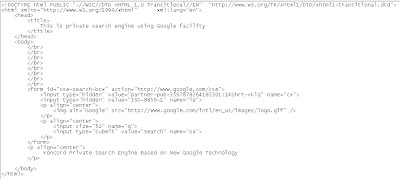
Following is the most essential part of the HTML. Save it as HTML format and replace “<“ with “<” since blogspot.com using HTML and it is not possible to publish .
<html>
<body>
<form id="cse-search-box" action="http://www.google.com/cse">
<input type="hidden" value="partner-pub-3597878264183301:140hrt-vklq" name="cx">
<input size="50" name="q">
<input type="submit" value="Search" name="sa">
</form>
</body>
</html>
That is what looks like:
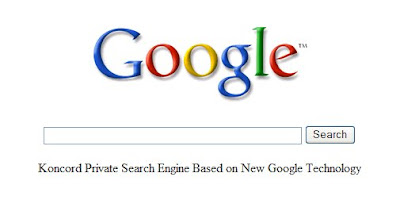
http://www.google.com/coop/docs/cse/resultsxml.html
<!DOCTYPE html PUBLIC "-//W3C//DTD XHTML 1.0 Transitional//EN" "http://www.w3.org/TR/xhtml1/DTD/xhtml1-transitional.dtd">
<html xmlns="http://www.w3.org/1999/xhtml" xml:lang="en">
<head>
<title>
This is private search engine using Google facility
</title>
</head>
<body>
</br>
</br>
</br>
</br>
</br>
</br>
</br>
</br>
<form id="cse-search-box" action="http://www.google.com/cse">
<input type="hidden" value="partner-pub-3597878264183301:140hrt-vklq" name="cx">
<input type="hidden" value="ISO-8859-1" name="ie">
<p align="center">
<img alt="Google" src="http://www.google.com/intl/en_us/images/logo.gif" />
</p>
<p align="center">
<input size="50" name="q">
<input type="submit" value="Search" name="sa">
</p>
</form>
<p align="center">
Koncord Private Search Engine Based on New Google Technology
</p>
</body>
</html>

Following is the most essential part of the HTML. Save it as HTML format and replace “<“ with “<” since blogspot.com using HTML and it is not possible to publish .
<html>
<body>
<form id="cse-search-box" action="http://www.google.com/cse">
<input type="hidden" value="partner-pub-3597878264183301:140hrt-vklq" name="cx">
<input size="50" name="q">
<input type="submit" value="Search" name="sa">
</form>
</body>
</html>
That is what looks like:

http://www.google.com/coop/docs/cse/resultsxml.html
Subscribe to:
Comments (Atom)

 Posts
Posts

