Somehow JavaScript mixed objects with attributes. For instance:
document.formName.listBoxName[i].selected
formName and listBoxName are references to two bojects. It might be good, but it just crosses the boundary of reference to object and the attributes. Don't know if this the the reason, to get selected item's value in form seems not easy. Google search shows there are so many people ask the question and not get right answers. Here is the easier way:
; function getValueOfSelectedItem(obj)
{ ; var val = obj.options[obj.selectedIndex].value
; if (val) (use val here)
}
To call this function, put the caller on onchange in HTML codes:
onChange="getValueOfSelectedItem(this)"
The beauty of it is there is no mixture of reference and attribute and you can pass anything of it without worry of crossing boundary issue.
http://www.java2s.com/Code/JavaScriptReference/Javascript-Properties/selectedIndexExample.htm
Showing posts with label HTML. Show all posts
Showing posts with label HTML. Show all posts

Can JavaScript Codes Be Added To SSRS Report?
The SQL Server Reporting Services HTML is poorly constructed so that the tags you'd most want to customize don't have Id's or Classes assigned. In addition, the ASPX pages just reference compiled assemblies, so the only real way to modify them is via CSS. Someone tried to edit the ReportingServices.js file, but it is neither the concept of customization nor standard functionality.
Conclusion: you could not add JavaScript block onto SSRS.
http://geekswithblogs.net/mnf/archive/2007/11/25/sql-server-reporting-services-notes.aspx
http://geekswithblogs.net/mnf/archive/2007/11/25/sql-server-reporting-services-notes.aspx
http://stackoverflow.com/questions/789303/is-it-possible-to-embed-javascript-into-an-ssrs-report
Conclusion: you could not add JavaScript block onto SSRS.
http://geekswithblogs.net/mnf/archive/2007/11/25/sql-server-reporting-services-notes.aspx
http://geekswithblogs.net/mnf/archive/2007/11/25/sql-server-reporting-services-notes.aspx
http://stackoverflow.com/questions/789303/is-it-possible-to-embed-javascript-into-an-ssrs-report
Form And Table In HTML
In general, entire form must be completely included into a single table cell (single TD element). For format purpose, one might put form head/declaration outside the table and input items spread over cells. Put entire form with in a table but spread over several rows (TR elements), it will fail.
In addition, if one uses DHTML, form outsider table may not work in some browser, such as IE.
Conclusion: Put entire form completely with in a single table cell will be the best practice.
http://www.cs.tut.fi/~jkorpela/forms/tables.html
In addition, if one uses DHTML, form outsider table may not work in some browser, such as IE.
Conclusion: Put entire form completely with in a single table cell will be the best practice.
http://www.cs.tut.fi/~jkorpela/forms/tables.html
Enforcing Width Of Cell <td> In HTML Table
It is hard to atomically break down long string such as URL to ensure the width in HTML. Here is a solution.
Within the cell or <td> section, cover your contents with a div section which shall include a width style property:
<div style="width:100px">
If that is not good enough, include this into your CSS:
word-wrap: break-word;
Within the cell or <td> section, cover your contents with a div section which shall include a width style property:
<div style="width:100px">
If that is not good enough, include this into your CSS:
word-wrap: break-word;
HTML Shows Nothing While Nothing Is Shown on Error Console
The most possible reason is either HTML or JavaScript codes are not clean. It often happens when you use Notepad to write codes. Another possibility is your JavaScript file is not accessible.
What Happened If Your PHP Not Showing?
If PHP was not enabled, your .php file will be treated as .html file. So, <?php…> will be treated as html tag, which would not show at all. More tricky is, if your codes include ->, the first > will be treated as the end tag for <?php…>. This would confuse you because you would think the first -> has been mistakenly regarded as ?>.
Here are solutions. First, save as following piece of codes as phpinfo.php:
<?php
phpinfo();
?>
Then call it in your browser. It will list all of the configuration information about php. If it shows a blank page, it means your php has not been enabled.
If you are in personal server, run following scripts:
LoadModule php5_module "/path/to/php5apache2_2.dll" #use php5apache2.dll for apache 2.x, use php5apache.dll for apache1.x
AddType application/x-httpd-php .php
If you are in shared server, contact administrator.
The another possibility is your server does not recognize your php codes if they were composited by text editor such as Notepad, which indeed still have some uncleared characters. To overcome this, find a pure cleaning php code editor, such as Crimson Editor, copy to it and save as new .php file.
Here are solutions. First, save as following piece of codes as phpinfo.php:
<?php
phpinfo();
?>
Then call it in your browser. It will list all of the configuration information about php. If it shows a blank page, it means your php has not been enabled.
If you are in personal server, run following scripts:
LoadModule php5_module "/path/to/php5apache2_2.dll" #use php5apache2.dll for apache 2.x, use php5apache.dll for apache1.x
AddType application/x-httpd-php .php
If you are in shared server, contact administrator.
The another possibility is your server does not recognize your php codes if they were composited by text editor such as Notepad, which indeed still have some uncleared characters. To overcome this, find a pure cleaning php code editor, such as Crimson Editor, copy to it and save as new .php file.
Koncord Code Cleanser
We have officially deployed an online code optimizer located at: http://koncord.webs.com/.
The code optimizer can compress your website codes as well as remove comments on codes, which supposed to be used by the programmers.
Please use Firefox since IE won’t work properly.
Click here to go there: http://koncord.webs.com/
Following is the Terms of Services of Koncord Partners: http://koncordpartners.blogspot.com/2010/06/terms-of-services.html
The code optimizer can compress your website codes as well as remove comments on codes, which supposed to be used by the programmers.
Please use Firefox since IE won’t work properly.
Click here to go there: http://koncord.webs.com/
Following is the Terms of Services of Koncord Partners: http://koncordpartners.blogspot.com/2010/06/terms-of-services.html
HTML Page Loading Sequence
HTML page loading sequence is to load head first, then body, then window.onload event. If one use document.write() to write DHTML and for which the value is to be assigned by window.onload event, it will be failed because HTML body would be loaded before window.onload event. That is why in DHTML, document. getElementById().innerHTML is preferred in comparison to document.write().
When HTML head being loaded, sequentially it loads external JavaScript files. If more than one JS files exist, be careful the sequence; because for functions have not loaded yet, but called by window.onload, an error will occur.
When HTML head being loaded, sequentially it loads external JavaScript files. If more than one JS files exist, be careful the sequence; because for functions have not loaded yet, but called by window.onload, an error will occur.
Option List in HTML
Code in HTML:
‹form id="oForm" name="oForm" action="" method="POST"›
‹select id="sList" name="sList" onchange="picking(this.form.cateList)"›
‹/select›
‹/form›
Script in JavaScript:
; var position
; var len
; window.onload = function()
{ ; len = selfCate.length
; for (var i=0; i
; document.cateForm.cateList[len].selected = true
; position = len
}
; function picking(dropDown)
{ ; var myIndex = dropDown.selectedIndex
; position = dropDown.options[myIndex].value
}
; function createOption(formName, selectName, indexValue, newText)
{ ; var objSelect = document.forms[formName].elements[selectName]
; var objOption = document.createElement("option")
; objOption.value = indexValue
; objOption.text = newText
; if(document.all && !(window.opera)) objSelect.add(objOption)
else objSelect.add(objOption, null)
}
; function removeOptions(selectId, firstNumToKeep, lastNumTokeep)
{ ; var elSel = document.getElementById(selectId)
; var total = elSel.length - lastNumTokeep - 1
; for (var i=total; i>=firstNumToKeep; i--) elSel.remove(i)
}
Special Notes:
1. In window.onload, “document.cateForm.cateList[len].selected = true” is to show what item is preselected in HTML. It is “position = len” to tell PHP what was preselected, if preselected has not been changed.
2. In picking(), apart of the need of global variable, the writing of var position = dropDown.options[myIndex].value is not recommended because some browser request variable declaration and assignment being separated.
‹form id="oForm" name="oForm" action="" method="POST"›
‹select id="sList" name="sList" onchange="picking(this.form.cateList)"›
‹/select›
‹/form›
Script in JavaScript:
; var position
; var len
; window.onload = function()
{ ; len = selfCate.length
; for (var i=0; i
; document.cateForm.cateList[len].selected = true
; position = len
}
; function picking(dropDown)
{ ; var myIndex = dropDown.selectedIndex
; position = dropDown.options[myIndex].value
}
; function createOption(formName, selectName, indexValue, newText)
{ ; var objSelect = document.forms[formName].elements[selectName]
; var objOption = document.createElement("option")
; objOption.value = indexValue
; objOption.text = newText
; if(document.all && !(window.opera)) objSelect.add(objOption)
else objSelect.add(objOption, null)
}
; function removeOptions(selectId, firstNumToKeep, lastNumTokeep)
{ ; var elSel = document.getElementById(selectId)
; var total = elSel.length - lastNumTokeep - 1
; for (var i=total; i>=firstNumToKeep; i--) elSel.remove(i)
}
Special Notes:
1. In window.onload, “document.cateForm.cateList[len].selected = true” is to show what item is preselected in HTML. It is “position = len” to tell PHP what was preselected, if preselected has not been changed.
2. In picking(), apart of the need of global variable, the writing of var position = dropDown.options[myIndex].value is not recommended because some browser request variable declaration and assignment being separated.
Multiple Forms in HTML
If there are more than one form in HTML, give every input item a global unique id and name. Else, PHP won’t be able to pick up right item, although you might put input item in right order in HTML.
Unicode Like Chinese Japanese Korean Characters In and Out MySQL Through PHP & Java
Both MySQL and PHP/Java support the Unicode, namely UTF-8. To be able to store into and retrieve these Unicode characters in MySQL database, one would need to do following things:
MySQL needs to be informed through PHP/Java. So, following code needs to be placed just after the connection. If the connection is centralized, this code is better to be in that centralized file:
PHP: mysql_query("SET NAMES 'UTF8'");
Java: stmt.execute("SET NAMES 'utf8'");
For all your PHP files generates HTML scripts, please include following code at top of the file:
header("Content-Type: text/html; charset=UTF-8");
For all your HTML files, following script is needed in the head of HTML:
‹ meta http-equiv="Content-Type" content="text/html; charset=UTF-8" ›
Done. Please note, in first piece of PHP code, it is UTF8 and in second PHP code and last HTML script it is UTF-8. Else, it won’t work properly.
If your codes include any of following piece, simply remove it:
PHP: mysql_query("SET CHARACTER SET 'UTF8'");
Java: stmt.execute("SET CHARACTER SET 'utf8'");
MySQL needs to be informed through PHP/Java. So, following code needs to be placed just after the connection. If the connection is centralized, this code is better to be in that centralized file:
PHP: mysql_query("SET NAMES 'UTF8'");
Java: stmt.execute("SET NAMES 'utf8'");
For all your PHP files generates HTML scripts, please include following code at top of the file:
header("Content-Type: text/html; charset=UTF-8");
For all your HTML files, following script is needed in the head of HTML:
‹ meta http-equiv="Content-Type" content="text/html; charset=UTF-8" ›
Done. Please note, in first piece of PHP code, it is UTF8 and in second PHP code and last HTML script it is UTF-8. Else, it won’t work properly.
If your codes include any of following piece, simply remove it:
PHP: mysql_query("SET CHARACTER SET 'UTF8'");
Java: stmt.execute("SET CHARACTER SET 'utf8'");
CSS and Link
CSS can be written two ways. The first way has selector and second way does not have selector but class selectors only.
First way:
sty
{ color: #333333;
}
First way covers every situation of class selectors. One for all. However, if a particular situation, say “hover” is needed to be excluded from the uniform of selector, it can be added as an overwrite:
sty
{ color: #333333;
}
sty:hover
{ color: #CCCCCC;
}
Second way:
sty:link
{ color: #333333;
}
sty:visited
{ color: #FFFFFF;
}
sty:hover
{ color: #CCCCCC;
}
sty:active
{ color: #333333;
}
Using second way, one must specify every situation. Else, it would inherited from the rule that is used by the element in which the link exists. For 2nd way, there is an order requirement: LoVe/HAte, else, it won't work.
The CSS can be not only used for link, but text as well. However, to enable class selectors work properly, the anchor must be exist:
‹a href="http://koncordpartners.blogspot.com" class="sty"›
This is the anchor started with letter “a”. If no link needed, use this href: href="#".
‹/a›
It also means applying class at table or cell/td level won'd work.
http://www.projectseven.com/tutorials/css/pseudoclasses/
First way:
sty
{ color: #333333;
}
First way covers every situation of class selectors. One for all. However, if a particular situation, say “hover” is needed to be excluded from the uniform of selector, it can be added as an overwrite:
sty
{ color: #333333;
}
sty:hover
{ color: #CCCCCC;
}
Second way:
sty:link
{ color: #333333;
}
sty:visited
{ color: #FFFFFF;
}
sty:hover
{ color: #CCCCCC;
}
sty:active
{ color: #333333;
}
Using second way, one must specify every situation. Else, it would inherited from the rule that is used by the element in which the link exists. For 2nd way, there is an order requirement: LoVe/HAte, else, it won't work.
The CSS can be not only used for link, but text as well. However, to enable class selectors work properly, the anchor must be exist:
‹a href="http://koncordpartners.blogspot.com" class="sty"›
This is the anchor started with letter “a”. If no link needed, use this href: href="#".
‹/a›
It also means applying class at table or cell/td level won'd work.
http://www.projectseven.com/tutorials/css/pseudoclasses/
Test Various “Nothings” in PHP
Following php codes is to test six different “nothing”variables together with popular functions, plus number 1 as control.
‹?php
$undefinedVar;
$nullVar = null;
$strEmpty = "";
$strChanged = "initial value";
$numZero = 0;
$numChanged = 1;
$numOne = 1;
$strChanged = null;
$numChanged = null;
echo "‹br/›11. undefinedVar: (".$undefinedVar.")";
echo "‹br/›12. nullVar: (".$nullVar.")";
echo "‹br/›13. strEmpty: (".$strEmpty.")";
echo "‹br/›14. strChanged: (".$strChanged.")";
echo "‹br/›15. numZero: (".$numZero.")";
echo "‹br/›16. numChanged: (".$numChanged.")";
echo "‹br/›21. is_null-undefinedVar: (".is_null($undefinedVar).")";
echo "‹br/›22. is_null-nullVar: (".is_null($nullVar).")";
echo "‹br/›23. is_null-strEmpty: (".is_null($strEmpty).")";
echo "‹br/›24. is_null-strChanged: (".is_null($strChanged).")";
echo "‹br/›25. is_null-numZero: (".is_null($numZero).")";
echo "‹br/›26. is_null-numChanged: (".is_null($numChanged).")";
echo "‹br/›31. isset-undefinedVar: (".isset($undefinedVar).")";
echo "‹br/›32. isset-nullVar: (".isset($nullVar).")";
echo "‹br/›33. isset-strEmpty: (".isset($strEmpty).")";
echo "‹br/›34. isset-strChanged: (".isset($strChanged).")";
echo "‹br/›35. isset-numZero: (".isset($numZero).")";
echo "‹br/›36. isset-numChanged: (".isset($numChanged).")";
echo "‹br/›47. TRUE: (".TRUE.")";
echo "‹br/›48. FALSE: (".FALSE.")";
echo "‹br/›51. empty-undefinedVar: (".empty($undefinedVar).")";
echo "‹br/›52. empty-nullVar: (".empty($nullVar).")";
echo "‹br/›53. empty-strEmpty: (".empty($strEmpty).")";
echo "‹br/›54. empty-strChanged: (".empty($strChanged).")";
echo "‹br/›55. empty-numZero: (".empty($numZero).")";
echo "‹br/›56. empty-numChanged: (".empty($numChanged).")";
echo "‹br/›57. empty-numOne: (".empty($numOne).")";
echo "‹br/›61. defined-undefinedVar: (".defined($undefinedVar).")";
echo "‹br/›62. defined-nullVar: (".defined($nullVar).")";
echo "‹br/›63. defined-strEmpty: (".defined($strEmpty).")";
echo "‹br/›64. defined-strChanged: (".defined($strChanged).")";
echo "‹br/›65. defined-numZero: (".defined($numZero).")";
echo "‹br/›66. defined-numChanged: (".defined($numChanged).")";
echo "‹br/›71. strlen-trim-undefinedVar: (".strlen(trim($undefinedVar)).")";
echo "‹br/›72. strlen-trim-nullVar: (".strlen(trim($nullVar)).")";
echo "‹br/›73. strlen-trim-strEmpty: (".strlen(trim($strEmpty)).")";
echo "‹br/›74. strlen-trim-strChanged: (".strlen(trim($strChanged)).")";
echo "‹br/›75. strlen-trim-numZero: (".strlen(trim($numZero)).")";
echo "‹br/›76. strlen-trim-numChanged: (".strlen(trim($numChanged)).")";
?›
unset() does not work for any one of them. Therefore, it had been excluded.
Test results in both Firefox and IE are identical, as follows:
11. undefinedVar: ()
12. nullVar: ()
13. strEmpty: ()
14. strChanged: ()
15. numZero: (0)
16. numChanged: ()
21. is_null-undefinedVar: (1)
22. is_null-nullVar: (1)
23. is_null-strEmpty: ()
24. is_null-strChanged: (1)
25. is_null-numZero: ()
26. is_null-numChanged: (1)
31. isset-undefinedVar: ()
32. isset-nullVar: ()
33. isset-strEmpty: (1)
34. isset-strChanged: ()
35. isset-numZero: (1)
36. isset-numChanged: ()
47. TRUE: (1)
48. FALSE: ()
51. empty-undefinedVar: (1)
52. empty-nullVar: (1)
53. empty-strEmpty: (1)
54. empty-strChanged: (1)
55. empty-numZero: (1)
56. empty-numChanged: (1)
57. empty-numOne: ()
61. defined-undefinedVar: ()
62. defined-nullVar: ()
63. defined-strEmpty: ()
64. defined-strChanged: ()
65. defined-numZero: ()
66. defined-numChanged: ()
71. strlen-trim-undefinedVar: (0)
72. strlen-trim-nullVar: (0)
73. strlen-trim-strEmpty: (0)
74. strlen-trim-strChanged: (0)
75. strlen-trim-numZero: (1)
76. strlen-trim-numChanged: (0)
Observed, included but not limited to this test:
1. Results in Firefox and IE are exactly same. However, if an null variable passed from JavaScript to PHP, in IE, it would be shown as a string "null". In a real case scenario, a variable is to pass from form feeding in HTML/JavaScript to PHP. However, it had only be assigned with value “null”. It supposes an integer data type. Unfortunately, in is_null() in PHP, it results not null, while echo shows “null” in IE and nothing in Firefox.
2. unset() does not work at all for all of them.
3. is_null() works fine. It however regards empty string as not null, which should be.
4. isset() works fine. It regards empty string as set.
5. is_null() is just opposite to isset().
6. empty() works for all, including regarding number 0 as empty.
7. defined() is to detect if a constant string exists, which does works fine here, since no constant string here.
8. strlen(trim()) does work fine except number 0, which should be.
Conclusion:
First of all, never use null in JavaScript where it supposed to be a string. Use '' instead. This is because in IE, when JavaScript passes string to PHP, null would become 'null'.
1. If one want to include everything, null, empty string, number 0, and even string “0”, the best approach is to use if(empty($var)).
2. If one wants to include null and empty string and exclude number 0, if(0==strlen(trim($var)) might be best approach. However, this approach is unable to detect the string "null".
3. If one wants to include null and number 0 and exclude empty string, the best approach maybe if(is_null($var) || 0==$var).
4. If one wants to only include null and exclude empty string and number 0, the best approach is if(is_null($var)). However, since both JavaScript and PHP does not tell the data type when declare a variable, it somehow easily to be mixed up the undefined variable or null variable with empty string. It is therefore suggested extra caution shall be applied to exclude empty string.
5. In most case people dealing with null would include undefined variable, null variable, empty string in JavaScript and PHP. For special case mentioned above for IE, it would includes string "null" as well, which isn't covered by Conclustion 2. So, the possible most save approach is put two together:
if(0==strlen(trim($var)) || "null"==$var)
6. To deal with undefined array, please refer to http://koncordpartners.blogspot.com/2009/12/number-of-elements-of-array.html.
http://ca2.php.net/manual/en/function.empty.php
‹?php
$undefinedVar;
$nullVar = null;
$strEmpty = "";
$strChanged = "initial value";
$numZero = 0;
$numChanged = 1;
$numOne = 1;
$strChanged = null;
$numChanged = null;
echo "‹br/›11. undefinedVar: (".$undefinedVar.")";
echo "‹br/›12. nullVar: (".$nullVar.")";
echo "‹br/›13. strEmpty: (".$strEmpty.")";
echo "‹br/›14. strChanged: (".$strChanged.")";
echo "‹br/›15. numZero: (".$numZero.")";
echo "‹br/›16. numChanged: (".$numChanged.")";
echo "‹br/›21. is_null-undefinedVar: (".is_null($undefinedVar).")";
echo "‹br/›22. is_null-nullVar: (".is_null($nullVar).")";
echo "‹br/›23. is_null-strEmpty: (".is_null($strEmpty).")";
echo "‹br/›24. is_null-strChanged: (".is_null($strChanged).")";
echo "‹br/›25. is_null-numZero: (".is_null($numZero).")";
echo "‹br/›26. is_null-numChanged: (".is_null($numChanged).")";
echo "‹br/›31. isset-undefinedVar: (".isset($undefinedVar).")";
echo "‹br/›32. isset-nullVar: (".isset($nullVar).")";
echo "‹br/›33. isset-strEmpty: (".isset($strEmpty).")";
echo "‹br/›34. isset-strChanged: (".isset($strChanged).")";
echo "‹br/›35. isset-numZero: (".isset($numZero).")";
echo "‹br/›36. isset-numChanged: (".isset($numChanged).")";
echo "‹br/›47. TRUE: (".TRUE.")";
echo "‹br/›48. FALSE: (".FALSE.")";
echo "‹br/›51. empty-undefinedVar: (".empty($undefinedVar).")";
echo "‹br/›52. empty-nullVar: (".empty($nullVar).")";
echo "‹br/›53. empty-strEmpty: (".empty($strEmpty).")";
echo "‹br/›54. empty-strChanged: (".empty($strChanged).")";
echo "‹br/›55. empty-numZero: (".empty($numZero).")";
echo "‹br/›56. empty-numChanged: (".empty($numChanged).")";
echo "‹br/›57. empty-numOne: (".empty($numOne).")";
echo "‹br/›61. defined-undefinedVar: (".defined($undefinedVar).")";
echo "‹br/›62. defined-nullVar: (".defined($nullVar).")";
echo "‹br/›63. defined-strEmpty: (".defined($strEmpty).")";
echo "‹br/›64. defined-strChanged: (".defined($strChanged).")";
echo "‹br/›65. defined-numZero: (".defined($numZero).")";
echo "‹br/›66. defined-numChanged: (".defined($numChanged).")";
echo "‹br/›71. strlen-trim-undefinedVar: (".strlen(trim($undefinedVar)).")";
echo "‹br/›72. strlen-trim-nullVar: (".strlen(trim($nullVar)).")";
echo "‹br/›73. strlen-trim-strEmpty: (".strlen(trim($strEmpty)).")";
echo "‹br/›74. strlen-trim-strChanged: (".strlen(trim($strChanged)).")";
echo "‹br/›75. strlen-trim-numZero: (".strlen(trim($numZero)).")";
echo "‹br/›76. strlen-trim-numChanged: (".strlen(trim($numChanged)).")";
?›
unset() does not work for any one of them. Therefore, it had been excluded.
Test results in both Firefox and IE are identical, as follows:
11. undefinedVar: ()
12. nullVar: ()
13. strEmpty: ()
14. strChanged: ()
15. numZero: (0)
16. numChanged: ()
21. is_null-undefinedVar: (1)
22. is_null-nullVar: (1)
23. is_null-strEmpty: ()
24. is_null-strChanged: (1)
25. is_null-numZero: ()
26. is_null-numChanged: (1)
31. isset-undefinedVar: ()
32. isset-nullVar: ()
33. isset-strEmpty: (1)
34. isset-strChanged: ()
35. isset-numZero: (1)
36. isset-numChanged: ()
47. TRUE: (1)
48. FALSE: ()
51. empty-undefinedVar: (1)
52. empty-nullVar: (1)
53. empty-strEmpty: (1)
54. empty-strChanged: (1)
55. empty-numZero: (1)
56. empty-numChanged: (1)
57. empty-numOne: ()
61. defined-undefinedVar: ()
62. defined-nullVar: ()
63. defined-strEmpty: ()
64. defined-strChanged: ()
65. defined-numZero: ()
66. defined-numChanged: ()
71. strlen-trim-undefinedVar: (0)
72. strlen-trim-nullVar: (0)
73. strlen-trim-strEmpty: (0)
74. strlen-trim-strChanged: (0)
75. strlen-trim-numZero: (1)
76. strlen-trim-numChanged: (0)
Observed, included but not limited to this test:
1. Results in Firefox and IE are exactly same. However, if an null variable passed from JavaScript to PHP, in IE, it would be shown as a string "null". In a real case scenario, a variable is to pass from form feeding in HTML/JavaScript to PHP. However, it had only be assigned with value “null”. It supposes an integer data type. Unfortunately, in is_null() in PHP, it results not null, while echo shows “null” in IE and nothing in Firefox.
2. unset() does not work at all for all of them.
3. is_null() works fine. It however regards empty string as not null, which should be.
4. isset() works fine. It regards empty string as set.
5. is_null() is just opposite to isset().
6. empty() works for all, including regarding number 0 as empty.
7. defined() is to detect if a constant string exists, which does works fine here, since no constant string here.
8. strlen(trim()) does work fine except number 0, which should be.
Conclusion:
First of all, never use null in JavaScript where it supposed to be a string. Use '' instead. This is because in IE, when JavaScript passes string to PHP, null would become 'null'.
1. If one want to include everything, null, empty string, number 0, and even string “0”, the best approach is to use if(empty($var)).
2. If one wants to include null and empty string and exclude number 0, if(0==strlen(trim($var)) might be best approach. However, this approach is unable to detect the string "null".
3. If one wants to include null and number 0 and exclude empty string, the best approach maybe if(is_null($var) || 0==$var).
4. If one wants to only include null and exclude empty string and number 0, the best approach is if(is_null($var)). However, since both JavaScript and PHP does not tell the data type when declare a variable, it somehow easily to be mixed up the undefined variable or null variable with empty string. It is therefore suggested extra caution shall be applied to exclude empty string.
5. In most case people dealing with null would include undefined variable, null variable, empty string in JavaScript and PHP. For special case mentioned above for IE, it would includes string "null" as well, which isn't covered by Conclustion 2. So, the possible most save approach is put two together:
if(0==strlen(trim($var)) || "null"==$var)
6. To deal with undefined array, please refer to http://koncordpartners.blogspot.com/2009/12/number-of-elements-of-array.html.
http://ca2.php.net/manual/en/function.empty.php
Are “Title” and "Top" Keywords in JavaScript?
No, actually they is not. However, please do not use them as name or id in HTML. Following problem has been notices:
‹input id=”title” type=”text” value”Title is forbidden” ›
When try to get value by document.getElementById('title').value, it generate null in IE. If one exchanges the “title” with other word, it works fine.
In Chrome, one case use top() as function name, it does not work while it works fine with IE and Firefox.
Very special!
http://aptana.com/reference/html/api/JSKeywords.index.html
‹input id=”title” type=”text” value”Title is forbidden” ›
When try to get value by document.getElementById('title').value, it generate null in IE. If one exchanges the “title” with other word, it works fine.
In Chrome, one case use top() as function name, it does not work while it works fine with IE and Firefox.
Very special!
http://aptana.com/reference/html/api/JSKeywords.index.html
Structure in Web Development (1)
This is study notes of web development involving the relationship and value passing between technologies.
HTML, Hyper Text Markup Language, as its name suggested is a markup language, which does formatting for the document; such as font, border format for cells in table, etc. There are two parts in HTML, head section and body section. Head contains all metadata, controls and the body is the document to be presented in web browser. When URL called by browser, whole HTML file is downloaded in the browser’ computer, which means it is a client side process.
To be easily and programmatically changed or updated, all formats can be centrally managed by a separate file, with extension of .css. This is the file of Cascading Style Sheets, or CSS. The inner link between two files is done through the following declaration to be included in the head of HTML:
‹link rel="stylesheet" type="text/css" href="cssFilename.css"›
In addition, in each division of HTML, “class=”classInCSS”” is needed to point the format class in CSS file. There is no value passing between two files.
Both HTML and CSS do not have programming functionality. To add the programming functionality, JavaScript can be added in HTML. Since programming functions are not of the presentation, it therefore locates in the head of HTML. However, when JavaScript consists too much contents, it can be separated as a file with extension of .js. The inner link between two files is done through the following declaration to be included in the head of HTML:
‹script type='text/javascript' language='Javascript' src='javascriptFileName.js' ›‹/script›
When JavaScript file is called by the HTML in browser’s computer, the whole file is downloaded too. So, JavaScript is also the client side process. Since contents of HTML may need to be changed frequently, separation of HTML and JavaScript may help to improve the refresh speed because programming functions may not change so frequently. This is another reason why JavaScript needs to be an independent file. However, this reason may not sustainable in DHTML scenario, to be mentioned late. At this stage, we deal with the HTML with static contents.
Functions in JavaScript need to be invoked. It can be done through window events, such as mouse move, mouse over, mouse out, mouse click or HTML page on load, etc; or through the calling from another funcation. Since HTML content is static, when value in HTML need to be passed to JavaScript, it is no need to be dealt specifically. Programmer can just use that value when write JavaScript file. In other words, there is no value passed from HTML to JavaScript, apart from invoking action. However, if value passing from JavaScript to HTML is needed, it can be done through “documnt.write()” and “.innerHTML =” methods. “documnt.write()” is located within the body of HTML. Since HTML body is for presentation purpose, to use “documnt.write()” one much first declare it is of JavaScript scripts:
‹script type="text/javascript"›
document.write(' javascriptVariable ');
‹/script›
The major difference between “documnt.write()” and “.innerHTML =” is “documnt.write()” does not need trigger to be active, simply because it is located in the body of HTML. When HTML page loaded, it is invoked. On contrast, “.innerHTML =” is located in JavaScript section/file, it needs to be called either by window events or other functions. Generally, “.innerHTML =” method is recommended. For instance:
document.getElementById('aDivision').innerHTML = javascriptVariable;
By this way, the value javascriptVariable generated from JavaScript functions is delivered to a HTML division called “aDivision”. Since HTML is only the markup language, there will be no variable involved in pure HTML. Variables need to be declared in JavaScript. Indeed, by this way, HTML can have variables. In addition, by this way, the delivered can be not only a value of single variable, but also more complicated contents:
var dynamicTable = ‘‹table›‹tr›‹td›’ + javascriptVariable + ‘‹/td›‹/tr›‹/table›’;
document.getElementById('aDivision').innerHTML = dynamicTable;
Please note, variable dynamicTable now contains some HTML codes, as string. The actual delivered now is no longer the single value but a complete table. This is very much same concept of Dynamic SQL if one is familiar with the database. This indeed is the basic concept of Dynamic HTML, or DHTML, for which the contents together with associated HTML codes are dynamically generated by the running of JavaScript functions.
Each HTML together with its associated CSS and JavaScript files are an independent program. If there are more than one HTML pages in a website, how they are structured? Since HTML and CSS files do not really involve the value passing, Multiple HTML pages can share a single CSS file. One HTML can have more than one JavaScript files by declare both of them in the head:
‹script type='text/javascript' language='Javascript' src='javascriptFile_1.js' ›‹/script›
‹script type='text/javascript' language='Javascript' src='javascriptFile_2.js' ›‹/script›
When a function is called, the browser will first search if “this” file have this function, if not, it would automatically goes to other JavaScript files declared in same HTML file.
It is not recommended to share JavaScript file between HTML pages. Because invoking any function is through window events, such as on page load etc. Sharing JavaScript file just confuses the computer and yourself, on which page load, for instance. Window events such as “onload” is very much HTML page specified and is not generic. However, for those generic functions with absolutely no window events involved, it can be aggregated into a JavaScript file to be shared by multiple HTML files.
Since each HTML page is an independent program, access to other’s functions or passing value between HTML pages is not recommended, for the sake of programming convention as well as security concern. In special cases like one HTML page (child) was opened by another HTML page (parent), it can be done with limitation. For instance:
In parent JavaScript file:
var windowChild = window.open(url); // “url” is the string variable.
windowChild.close();
In this example, parent JavaScript opens a new HTML window and close it immediately.
In child JavaScript file:
var valueFromParent = window.opener.valuePassToChild;
Child HTML can thus access the value of a variable in parent HTML. In case the child window is opened within the iFrame of parent, it is :
var valueFromParent = parent.valuePassToChild;
Please take special note, this syntax is also true for object reference passing through HTML pages. We know that the reference acts as pointer to point to original variable rather than make a copy, any using of the reference, valueFromParent here, is indeed referencing back to parent HTML ‘s object. It does generate the issue of speed. For details, see http://koncordpartners.blogspot.com/. So, please do apply this to the object other than simple variable, such as array.
Following is the method when parent window calls functions located in iFrame child:
document.getElementById('iFrameID').contentWindow
.functionInIFrame(parameter);
If one include this into another function, that function indeed can be called by same or other iFrame windows:
In parent JavaScript file:
function crossWindow(parameter)
{ document.getElementById('iFrameName').contentWindow
.functionInIFrame(parameter);
};
In iFrame file:
crossWindow(parameter);
Unfortunate, the string iFrameName should not be variable, otherwise dynamic function will be involved. Furthermore, dynamic reference passing does never work properly. It therefore dynamic reference and dynamic function should be avoid. In this example, one can use “if” statement to pick up right inner function:
function crossWindow(option, parameter)
{ if (1==option) document.getElementById('iFrameName_1').contentWindow
.functionInIFrame(parameter)
else document.getElementById('iFrameName_2').contentWindow
.functionInIFrame(parameter);
};
When “parameter” is reference to variable located parent window, things become little complex. JavaScript indeed regards it is about the variable in iFrame window. One needs to declare parameter locally first:
var parameter = parent.paraInParent;
What about in iFrame child window, calling corssWindow() function is through dynamic insertion? Something like:
window.onload = function()
{ document.getElementById('dynamicContent').innerHTML = '‹a href="#" onclick="parent.crossWindow(‘ + parameter + ‘)"›Click here to run function in parent window‹/a›';
};
No, it would never work properly if parameter is the reference referring back to another variable in parent window.
(To be continued)
HTML, Hyper Text Markup Language, as its name suggested is a markup language, which does formatting for the document; such as font, border format for cells in table, etc. There are two parts in HTML, head section and body section. Head contains all metadata, controls and the body is the document to be presented in web browser. When URL called by browser, whole HTML file is downloaded in the browser’ computer, which means it is a client side process.
To be easily and programmatically changed or updated, all formats can be centrally managed by a separate file, with extension of .css. This is the file of Cascading Style Sheets, or CSS. The inner link between two files is done through the following declaration to be included in the head of HTML:
‹link rel="stylesheet" type="text/css" href="cssFilename.css"›
In addition, in each division of HTML, “class=”classInCSS”” is needed to point the format class in CSS file. There is no value passing between two files.
Both HTML and CSS do not have programming functionality. To add the programming functionality, JavaScript can be added in HTML. Since programming functions are not of the presentation, it therefore locates in the head of HTML. However, when JavaScript consists too much contents, it can be separated as a file with extension of .js. The inner link between two files is done through the following declaration to be included in the head of HTML:
‹script type='text/javascript' language='Javascript' src='javascriptFileName.js' ›‹/script›
When JavaScript file is called by the HTML in browser’s computer, the whole file is downloaded too. So, JavaScript is also the client side process. Since contents of HTML may need to be changed frequently, separation of HTML and JavaScript may help to improve the refresh speed because programming functions may not change so frequently. This is another reason why JavaScript needs to be an independent file. However, this reason may not sustainable in DHTML scenario, to be mentioned late. At this stage, we deal with the HTML with static contents.
Functions in JavaScript need to be invoked. It can be done through window events, such as mouse move, mouse over, mouse out, mouse click or HTML page on load, etc; or through the calling from another funcation. Since HTML content is static, when value in HTML need to be passed to JavaScript, it is no need to be dealt specifically. Programmer can just use that value when write JavaScript file. In other words, there is no value passed from HTML to JavaScript, apart from invoking action. However, if value passing from JavaScript to HTML is needed, it can be done through “documnt.write()” and “.innerHTML =” methods. “documnt.write()” is located within the body of HTML. Since HTML body is for presentation purpose, to use “documnt.write()” one much first declare it is of JavaScript scripts:
‹script type="text/javascript"›
document.write(' javascriptVariable ');
‹/script›
The major difference between “documnt.write()” and “.innerHTML =” is “documnt.write()” does not need trigger to be active, simply because it is located in the body of HTML. When HTML page loaded, it is invoked. On contrast, “.innerHTML =” is located in JavaScript section/file, it needs to be called either by window events or other functions. Generally, “.innerHTML =” method is recommended. For instance:
document.getElementById('aDivision').innerHTML = javascriptVariable;
By this way, the value javascriptVariable generated from JavaScript functions is delivered to a HTML division called “aDivision”. Since HTML is only the markup language, there will be no variable involved in pure HTML. Variables need to be declared in JavaScript. Indeed, by this way, HTML can have variables. In addition, by this way, the delivered can be not only a value of single variable, but also more complicated contents:
var dynamicTable = ‘‹table›‹tr›‹td›’ + javascriptVariable + ‘‹/td›‹/tr›‹/table›’;
document.getElementById('aDivision').innerHTML = dynamicTable;
Please note, variable dynamicTable now contains some HTML codes, as string. The actual delivered now is no longer the single value but a complete table. This is very much same concept of Dynamic SQL if one is familiar with the database. This indeed is the basic concept of Dynamic HTML, or DHTML, for which the contents together with associated HTML codes are dynamically generated by the running of JavaScript functions.
Each HTML together with its associated CSS and JavaScript files are an independent program. If there are more than one HTML pages in a website, how they are structured? Since HTML and CSS files do not really involve the value passing, Multiple HTML pages can share a single CSS file. One HTML can have more than one JavaScript files by declare both of them in the head:
‹script type='text/javascript' language='Javascript' src='javascriptFile_1.js' ›‹/script›
‹script type='text/javascript' language='Javascript' src='javascriptFile_2.js' ›‹/script›
When a function is called, the browser will first search if “this” file have this function, if not, it would automatically goes to other JavaScript files declared in same HTML file.
It is not recommended to share JavaScript file between HTML pages. Because invoking any function is through window events, such as on page load etc. Sharing JavaScript file just confuses the computer and yourself, on which page load, for instance. Window events such as “onload” is very much HTML page specified and is not generic. However, for those generic functions with absolutely no window events involved, it can be aggregated into a JavaScript file to be shared by multiple HTML files.
Since each HTML page is an independent program, access to other’s functions or passing value between HTML pages is not recommended, for the sake of programming convention as well as security concern. In special cases like one HTML page (child) was opened by another HTML page (parent), it can be done with limitation. For instance:
In parent JavaScript file:
var windowChild = window.open(url); // “url” is the string variable.
windowChild.close();
In this example, parent JavaScript opens a new HTML window and close it immediately.
In child JavaScript file:
var valueFromParent = window.opener.valuePassToChild;
Child HTML can thus access the value of a variable in parent HTML. In case the child window is opened within the iFrame of parent, it is :
var valueFromParent = parent.valuePassToChild;
Please take special note, this syntax is also true for object reference passing through HTML pages. We know that the reference acts as pointer to point to original variable rather than make a copy, any using of the reference, valueFromParent here, is indeed referencing back to parent HTML ‘s object. It does generate the issue of speed. For details, see http://koncordpartners.blogspot.com/. So, please do apply this to the object other than simple variable, such as array.
Following is the method when parent window calls functions located in iFrame child:
document.getElementById('iFrameID').contentWindow
.functionInIFrame(parameter);
If one include this into another function, that function indeed can be called by same or other iFrame windows:
In parent JavaScript file:
function crossWindow(parameter)
{ document.getElementById('iFrameName').contentWindow
.functionInIFrame(parameter);
};
In iFrame file:
crossWindow(parameter);
Unfortunate, the string iFrameName should not be variable, otherwise dynamic function will be involved. Furthermore, dynamic reference passing does never work properly. It therefore dynamic reference and dynamic function should be avoid. In this example, one can use “if” statement to pick up right inner function:
function crossWindow(option, parameter)
{ if (1==option) document.getElementById('iFrameName_1').contentWindow
.functionInIFrame(parameter)
else document.getElementById('iFrameName_2').contentWindow
.functionInIFrame(parameter);
};
When “parameter” is reference to variable located parent window, things become little complex. JavaScript indeed regards it is about the variable in iFrame window. One needs to declare parameter locally first:
var parameter = parent.paraInParent;
What about in iFrame child window, calling corssWindow() function is through dynamic insertion? Something like:
window.onload = function()
{ document.getElementById('dynamicContent').innerHTML = '‹a href="#" onclick="parent.crossWindow(‘ + parameter + ‘)"›Click here to run function in parent window‹/a›';
};
No, it would never work properly if parameter is the reference referring back to another variable in parent window.
(To be continued)
iFrame Height Issue
Changing height of iFrame from JavaScript function becomes painful task in new versions of both IE and Firefox. However, if one uses iFrame, adjusting its height to fit its contents is essential. The problem is the height of content is unknown when dramatic feeding required. The “orthodox” method to accomplish this task is to open iFrame with any height first, then adjust it on onLoad event. Width is less painful because for those iFrame to fit complete screen width, width=“100%” can be defined when iFrame is defined.
Basic idea of this “orthodox” approach includes two steps, detect the correct height and resize to it.
Detecting methods include:
- document.documentElement.clientHeight
- contentWindow.document.body.scrollHeight
Resize method is:
- document.getElementById('myIframe').style.height = newHeight
Basically, this approach does not work. There are several problems around it, such as assignment to .style.height does not work in Firefox. More serious problem is contentWindow.document.body.scrollHeight will return permission denial error message if host page and iFrame content page are not in the same domain; more precisely, the scheme, hostname and port match.
Another approach is to find the correct height before opening the iFrame. It is hard to detect the height of page to be inside of iFrame. However, since iFrame can have its own scroll bar, it may not be necessary to detect content’s height. The best approach might be to find available screen height of user after your title head. Following methods have been tested in Firefox and IE:
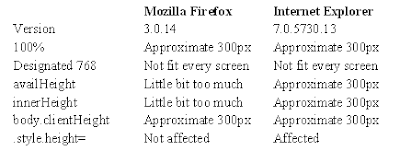
It appears Internet Explorer does not response to any of detections.
Following is the codes to apply this approach:
Codes in head:
‹script type="text/javascript"›
var url = "http://www.google.com/" // URL for your iFrame.
var titleHeight = 240;
var frameHeight = Math.max((screen.availHeight ? (screen.availHeight-titleHeight) : (window.innerHeight ? (window.innerHeight-titleHeight) : document.body.clientHeight)), 768);
window.document.onload = function {document.getElementById('linkIframe').style.height = frameHeight};
‹/script›
Codes in body:
‹script type="text/javascript"›
document.write('‹iframe id="linkIframe" width="100%" height="' + frameHeight + '" src="' + url + '" name="content"›‹/iframe›');
‹/script›
Basic idea of this “orthodox” approach includes two steps, detect the correct height and resize to it.
Detecting methods include:
- document.documentElement.clientHeight
- contentWindow.document.body.scrollHeight
Resize method is:
- document.getElementById('myIframe').style.height = newHeight
Basically, this approach does not work. There are several problems around it, such as assignment to .style.height does not work in Firefox. More serious problem is contentWindow.document.body.scrollHeight will return permission denial error message if host page and iFrame content page are not in the same domain; more precisely, the scheme, hostname and port match.
Another approach is to find the correct height before opening the iFrame. It is hard to detect the height of page to be inside of iFrame. However, since iFrame can have its own scroll bar, it may not be necessary to detect content’s height. The best approach might be to find available screen height of user after your title head. Following methods have been tested in Firefox and IE:

It appears Internet Explorer does not response to any of detections.
Following is the codes to apply this approach:
Codes in head:
‹script type="text/javascript"›
var url = "http://www.google.com/" // URL for your iFrame.
var titleHeight = 240;
var frameHeight = Math.max((screen.availHeight ? (screen.availHeight-titleHeight) : (window.innerHeight ? (window.innerHeight-titleHeight) : document.body.clientHeight)), 768);
window.document.onload = function {document.getElementById('linkIframe').style.height = frameHeight};
‹/script›
Codes in body:
‹script type="text/javascript"›
document.write('‹iframe id="linkIframe" width="100%" height="' + frameHeight + '" src="' + url + '" name="content"›‹/iframe›');
‹/script›
Local Address Error in HTML for Firefox
If you include the address like this “C:\Documents and Settings\...” in your HTML page, it would be Ok for IE to open it. However, it would be a problem for Firefox, sometimes. Following is the error message:
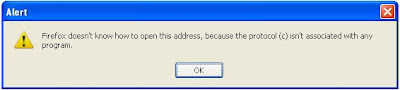
There is easy way to fix it – simply add “file:\\\” in front of your local address. It would look like: "file:\\\C:\Documents and Settings\..."
http://www.codingforums.com/archive/index.php/t-53382.html

There is easy way to fix it – simply add “file:\\\” in front of your local address. It would look like: "file:\\\C:\Documents and Settings\..."
http://www.codingforums.com/archive/index.php/t-53382.html
First Beta Version of Koncord Homepage Is Free to Download
We have prepared a single HTML page which can be used as a Homepage for your browsers. This page consists of popular websites, such as Gmail, Hotmail, etc. Of course, it also has built-in Koncord Private Search Engine.
This homepage is just like favourites in IE and bookmarks in Firefox.
Here is free download site:
Download from Uploading.com
The address is: http://uploading.com/files/7Z17FDD2/Koncord.html.html
This homepage is just like favourites in IE and bookmarks in Firefox.
Here is free download site:
Download from Uploading.com
The address is: http://uploading.com/files/7Z17FDD2/Koncord.html.html
Set Language in Private Search Engine
Our previous posting Create Your Own Search Engine (http://koncordpartners.blogspot.com/2009/07/create-your-own-search-engine.html) could only display search results in English. Actually, the codes in that posting only have 4 parameters, you can add much more to suit your own needs. These 4 Google WebSearch Query Parameters are:
cx - Required. The cx parameter specifies a unique code that identifies a custom search engine. You must specify a Custom Search Engine using the cx parameter to retrieve search results from that CSE.
ie - Optional. The ie parameter sets the character encoding scheme that should be used to interpret the query string. The default ie value is latin1.
q - Optional. The q parameter specifies the search query entered by the user. Even though this parameter is optional, you must specify a value for at least one of the query parameters (as_epq, as_lq, as_oq, as_q, as_rq) to get search results.
sa - Required. It is indeed you submit the search query to Google search engine.
Today, we add three more parameters to show how the Simplified Chinese and Traditional Chinese can be interchangeable as search result.
hl - Optional. The hl parameter specifies the interface language (host language) of your user interface. To improve the performance and the quality of your search results, you are strongly encouraged to set this parameter explicitly. However, a successful search engine does not rely only on the parameters, but also settings of search engine itself. That is why you may also need your own account. “Site language”, is not only the site language, but also the search engine host language (the display language other than search result). Naturally, it should be set as English. “Your site encoding”, which is the searching language, should be GB18030 in this example.
lr - Optional. The lr (language restrict) parameter restricts search results to documents written in a particular language. Google WebSearch determines the language of a document by analyzing:
- the top-level domain (TLD) of the document's URL
- language meta tags within the document
- the primary language used in the body text of the document
c2coff - Optional. The c2coff parameter enables or disables the Simplified and Traditional Chinese Search feature. Please note, this parameter is only related to Chinese. For other language, no need to use this. The default value for this parameter is "0" (zero), meaning that the feature is enabled. Values for the c2coff parameter are: 1 is disabled, and 0 is enabled.
Following is codes with these two parameters. It means the search will be restricted to only websites wrote in three languages: US English, Simplified Chinese and Traditional Chinese.
<!DOCTYPE html PUBLIC "-//W3C//DTD XHTML 1.0 Transitional//EN" "http://www.w3.org/TR/xhtml1/DTD/xhtml1-transitional.dtd">
<html xmlns="http://www.w3.org/1999/xhtml" xml:lang="en">
<head>
<title>
This is private search engine using Google facility
</title>
</head>
<body>
</br>
</br>
</br>
</br>
</br>
</br>
</br>
</br>
<form id="cse-search-box" action="http://www.google.com/cse">
<input type="hidden" value="partner-pub-3597878264183301:140hrt-vklq" name="cx">
<input type="hidden" value="GB18030" name="ie">
<input type="hidden" value="lang_en|lang_zh-Hans|lang_zh-Hant" name="lr">
<input type="hidden" value="0" name="c2coff">
<p align="center">
<img alt="Google" src="http://www.google.com/intl/en_us/images/logo.gif" />
</p>
<p align="center">
<input size="50" name="q">
<input type="submit" value="Search" name="sa">
</p>
</form>
<p align="center">
Koncord Private Search Engine Based on New Google Technology
</p>
</body>
</html>
http://www.google.com/coop/docs/cse/resultsxml.html
cx - Required. The cx parameter specifies a unique code that identifies a custom search engine. You must specify a Custom Search Engine using the cx parameter to retrieve search results from that CSE.
ie - Optional. The ie parameter sets the character encoding scheme that should be used to interpret the query string. The default ie value is latin1.
q - Optional. The q parameter specifies the search query entered by the user. Even though this parameter is optional, you must specify a value for at least one of the query parameters (as_epq, as_lq, as_oq, as_q, as_rq) to get search results.
sa - Required. It is indeed you submit the search query to Google search engine.
Today, we add three more parameters to show how the Simplified Chinese and Traditional Chinese can be interchangeable as search result.
hl - Optional. The hl parameter specifies the interface language (host language) of your user interface. To improve the performance and the quality of your search results, you are strongly encouraged to set this parameter explicitly. However, a successful search engine does not rely only on the parameters, but also settings of search engine itself. That is why you may also need your own account. “Site language”, is not only the site language, but also the search engine host language (the display language other than search result). Naturally, it should be set as English. “Your site encoding”, which is the searching language, should be GB18030 in this example.
lr - Optional. The lr (language restrict) parameter restricts search results to documents written in a particular language. Google WebSearch determines the language of a document by analyzing:
- the top-level domain (TLD) of the document's URL
- language meta tags within the document
- the primary language used in the body text of the document
c2coff - Optional. The c2coff parameter enables or disables the Simplified and Traditional Chinese Search feature. Please note, this parameter is only related to Chinese. For other language, no need to use this. The default value for this parameter is "0" (zero), meaning that the feature is enabled. Values for the c2coff parameter are: 1 is disabled, and 0 is enabled.
Following is codes with these two parameters. It means the search will be restricted to only websites wrote in three languages: US English, Simplified Chinese and Traditional Chinese.
<!DOCTYPE html PUBLIC "-//W3C//DTD XHTML 1.0 Transitional//EN" "http://www.w3.org/TR/xhtml1/DTD/xhtml1-transitional.dtd">
<html xmlns="http://www.w3.org/1999/xhtml" xml:lang="en">
<head>
<title>
This is private search engine using Google facility
</title>
</head>
<body>
</br>
</br>
</br>
</br>
</br>
</br>
</br>
</br>
<form id="cse-search-box" action="http://www.google.com/cse">
<input type="hidden" value="partner-pub-3597878264183301:140hrt-vklq" name="cx">
<input type="hidden" value="GB18030" name="ie">
<input type="hidden" value="lang_en|lang_zh-Hans|lang_zh-Hant" name="lr">
<input type="hidden" value="0" name="c2coff">
<p align="center">
<img alt="Google" src="http://www.google.com/intl/en_us/images/logo.gif" />
</p>
<p align="center">
<input size="50" name="q">
<input type="submit" value="Search" name="sa">
</p>
</form>
<p align="center">
Koncord Private Search Engine Based on New Google Technology
</p>
</body>
</html>
http://www.google.com/coop/docs/cse/resultsxml.html
Create Your Own Search Engine
Following is the most basic HTML code to create the custom search engine based on Google’s technology. Actually, it just passes parameters to Google’s search engine. If you have your own AdSense account, replace it with yours. You can always change the words and contents as you wish. You may also wish to save it as home page for your browser.
<!DOCTYPE html PUBLIC "-//W3C//DTD XHTML 1.0 Transitional//EN" "http://www.w3.org/TR/xhtml1/DTD/xhtml1-transitional.dtd">
<html xmlns="http://www.w3.org/1999/xhtml" xml:lang="en">
<head>
<title>
This is private search engine using Google facility
</title>
</head>
<body>
</br>
</br>
</br>
</br>
</br>
</br>
</br>
</br>
<form id="cse-search-box" action="http://www.google.com/cse">
<input type="hidden" value="partner-pub-3597878264183301:140hrt-vklq" name="cx">
<input type="hidden" value="ISO-8859-1" name="ie">
<p align="center">
<img alt="Google" src="http://www.google.com/intl/en_us/images/logo.gif" />
</p>
<p align="center">
<input size="50" name="q">
<input type="submit" value="Search" name="sa">
</p>
</form>
<p align="center">
Koncord Private Search Engine Based on New Google Technology
</p>
</body>
</html>
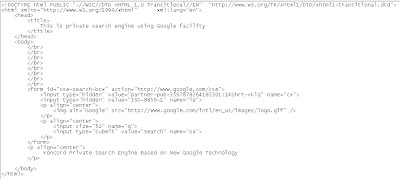
Following is the most essential part of the HTML. Save it as HTML format and replace “<“ with “<” since blogspot.com using HTML and it is not possible to publish .
<html>
<body>
<form id="cse-search-box" action="http://www.google.com/cse">
<input type="hidden" value="partner-pub-3597878264183301:140hrt-vklq" name="cx">
<input size="50" name="q">
<input type="submit" value="Search" name="sa">
</form>
</body>
</html>
That is what looks like:

http://www.google.com/coop/docs/cse/resultsxml.html
<!DOCTYPE html PUBLIC "-//W3C//DTD XHTML 1.0 Transitional//EN" "http://www.w3.org/TR/xhtml1/DTD/xhtml1-transitional.dtd">
<html xmlns="http://www.w3.org/1999/xhtml" xml:lang="en">
<head>
<title>
This is private search engine using Google facility
</title>
</head>
<body>
</br>
</br>
</br>
</br>
</br>
</br>
</br>
</br>
<form id="cse-search-box" action="http://www.google.com/cse">
<input type="hidden" value="partner-pub-3597878264183301:140hrt-vklq" name="cx">
<input type="hidden" value="ISO-8859-1" name="ie">
<p align="center">
<img alt="Google" src="http://www.google.com/intl/en_us/images/logo.gif" />
</p>
<p align="center">
<input size="50" name="q">
<input type="submit" value="Search" name="sa">
</p>
</form>
<p align="center">
Koncord Private Search Engine Based on New Google Technology
</p>
</body>
</html>

Following is the most essential part of the HTML. Save it as HTML format and replace “<“ with “<” since blogspot.com using HTML and it is not possible to publish .
<html>
<body>
<form id="cse-search-box" action="http://www.google.com/cse">
<input type="hidden" value="partner-pub-3597878264183301:140hrt-vklq" name="cx">
<input size="50" name="q">
<input type="submit" value="Search" name="sa">
</form>
</body>
</html>
That is what looks like:

http://www.google.com/coop/docs/cse/resultsxml.html
Subscribe to:
Posts (Atom)

 Posts
Posts

