The length you need in database to store URL should be 2083. This is because popular browser Internet Explorer only accepts 2083 characters. The question is, if you do not want this length or you want a shortened for some reason however, what is the best length?
The answer might be 255. OpenID indeed is a URL. According to OpenId 1.1 Appendix D: Limits, the maximum limit for Identifier Urls is 255 bytes.
http://support.microsoft.com/kb/208427
http://openid.net/specs/openid-authentication-1_1.html#limits
Showing posts with label Internet Explorer. Show all posts
Showing posts with label Internet Explorer. Show all posts

Invalid Argument Error in IE
Sometime you will get Error: Invalid argument in IE. No more other information. And this script runs well in Firefox and Chrome. Indeed, this error message tells true the argument is invalid. However, the problem is not when argument being used, but lies on when you get this argument. In one case:
1 ; var horizonPosi = (window.innerWidth/2 - 50) + 'px'
2 ; headerPainting.style.left = horizonPosi
the problem actually is caused by window.innerWidth. When print out, the argument as horizonPosi is indeed "NaNpx".
1 ; var horizonPosi = (window.innerWidth/2 - 50) + 'px'
2 ; headerPainting.style.left = horizonPosi
the problem actually is caused by window.innerWidth. When print out, the argument as horizonPosi is indeed "NaNpx".
Trouble with Internet Explorer
The purpose of this article is to establish an uniform convention to deal with a very special issue of IE. It is for sure without this convention, websites would still run with or without problem. The issue is when IE passing null value from JavaScript to PHP, null value becomes string "null". If there is a possibility the user input could be "null", such as using "null" as login name or password, there is no way for PHP to detect which "null" is null and which "null" is input "null".
So, the accurate solution is never let JavaScript passing null to PHP, but using '' instead. It sounds easy; but JavaScript can generate null value without your knowledge. That is, if a parameter passing through a function to feed a form, when original parameter is undefined, eventually that undefined would be become string "null" or string "undefined" at the end of PHP. So, you would need to deal with every form input by special arrangement as follows:
; document.theForm.theInputItem.value = (parameter) ? parameter : ''
Then, to test if it is valid in JavaScript would be changed to:
; if (''!=parameter) {...}
At PHP end, it is relatively easy to detect if it is a valid input:
if (0!=strlen(trim(@$_POST["theInputItem"]))) {...};
However, for numeric data, it is not suitable to use '' instead null. It is still suggested to code as usual. The only difference is at PHP end:
if (0!=strlen(trim(@$_POST["theInputItem"])) && is_numeric(@$_POST["theInputItem"])) {...};
http://koncordpartners.blogspot.com/2009/12/test-various-nothings-in-php.html
So, the accurate solution is never let JavaScript passing null to PHP, but using '' instead. It sounds easy; but JavaScript can generate null value without your knowledge. That is, if a parameter passing through a function to feed a form, when original parameter is undefined, eventually that undefined would be become string "null" or string "undefined" at the end of PHP. So, you would need to deal with every form input by special arrangement as follows:
; document.theForm.theInputItem.value = (parameter) ? parameter : ''
Then, to test if it is valid in JavaScript would be changed to:
; if (''!=parameter) {...}
At PHP end, it is relatively easy to detect if it is a valid input:
if (0!=strlen(trim(@$_POST["theInputItem"]))) {...};
However, for numeric data, it is not suitable to use '' instead null. It is still suggested to code as usual. The only difference is at PHP end:
if (0!=strlen(trim(@$_POST["theInputItem"])) && is_numeric(@$_POST["theInputItem"])) {...};
http://koncordpartners.blogspot.com/2009/12/test-various-nothings-in-php.html
Local Address Error in HTML for Firefox
If you include the address like this “C:\Documents and Settings\...” in your HTML page, it would be Ok for IE to open it. However, it would be a problem for Firefox, sometimes. Following is the error message:
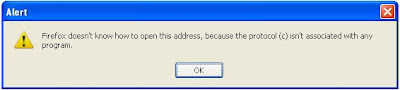
There is easy way to fix it – simply add “file:\\\” in front of your local address. It would look like: "file:\\\C:\Documents and Settings\..."
http://www.codingforums.com/archive/index.php/t-53382.html

There is easy way to fix it – simply add “file:\\\” in front of your local address. It would look like: "file:\\\C:\Documents and Settings\..."
http://www.codingforums.com/archive/index.php/t-53382.html
Subscribe to:
Posts (Atom)

 Posts
Posts

