Put it simple, domain name without www is the more authentic one. This is because HTTP does not specify your domain name must be started with www. or any other prefix. Indeed, www.yourdomain.com is just one of your subdomains.
Then why in early days every domain name starts with www? Well, it is just a common convention without much rationale, something like why at first place domain name on the Earth not like http:com.yourdomain.level-1-subdomain.level-2-sub/parameter-level-1/... We human being just sometimes make irrational stuff. So, early people name www.yourdomain.com as main domain and subdomain.yourdomain.com as subdomain, while technically they are all subdomains.
By now you would know www2., www3., www4. no longer a mystery. By now, most webmasters would have to make sure www.yourdomain.com being redirect to yourdomain.com.
Since www.yourdomain.com is just a subdomain of your main domain, it is no wonder search engines treat them as separate pages. This bad practice now is a norm to direct the yourdomain.com to www.yourdomain.com as part of getting your site SEO.
However, it is suggested to redirect www.yourdomain.com to yourdomain.com by include following code in your .htaccess file, which is located in public_html:
RewriteEngine On
RewriteBase /
RewriteCond %{HTTP_HOST} !^yourdomain.com [NC]
RewriteRule ^(.*)$ http://yourdomain.com/$1 [L,R=301]
http://www.seocompany.ca/seo/url-redirect.html
http://www.bluehostforum.com/showthread.php?t=1019
Showing posts with label Search Engine. Show all posts
Showing posts with label Search Engine. Show all posts

Why You Need a Private Search Engine
By create your own private search engine, you can put all your regular visiting websites into a single interface html page, then set it as your homepage. If you like, you can even set automatic login by a single click.
http://esupport.icewarp.com/index.php?_m=knowledgebase&_a=viewarticle&kbarticleid=51
http://esupport.icewarp.com/index.php?_m=knowledgebase&_a=viewarticle&kbarticleid=51
Set Language in Private Search Engine
Our previous posting Create Your Own Search Engine (http://koncordpartners.blogspot.com/2009/07/create-your-own-search-engine.html) could only display search results in English. Actually, the codes in that posting only have 4 parameters, you can add much more to suit your own needs. These 4 Google WebSearch Query Parameters are:
cx - Required. The cx parameter specifies a unique code that identifies a custom search engine. You must specify a Custom Search Engine using the cx parameter to retrieve search results from that CSE.
ie - Optional. The ie parameter sets the character encoding scheme that should be used to interpret the query string. The default ie value is latin1.
q - Optional. The q parameter specifies the search query entered by the user. Even though this parameter is optional, you must specify a value for at least one of the query parameters (as_epq, as_lq, as_oq, as_q, as_rq) to get search results.
sa - Required. It is indeed you submit the search query to Google search engine.
Today, we add three more parameters to show how the Simplified Chinese and Traditional Chinese can be interchangeable as search result.
hl - Optional. The hl parameter specifies the interface language (host language) of your user interface. To improve the performance and the quality of your search results, you are strongly encouraged to set this parameter explicitly. However, a successful search engine does not rely only on the parameters, but also settings of search engine itself. That is why you may also need your own account. “Site language”, is not only the site language, but also the search engine host language (the display language other than search result). Naturally, it should be set as English. “Your site encoding”, which is the searching language, should be GB18030 in this example.
lr - Optional. The lr (language restrict) parameter restricts search results to documents written in a particular language. Google WebSearch determines the language of a document by analyzing:
- the top-level domain (TLD) of the document's URL
- language meta tags within the document
- the primary language used in the body text of the document
c2coff - Optional. The c2coff parameter enables or disables the Simplified and Traditional Chinese Search feature. Please note, this parameter is only related to Chinese. For other language, no need to use this. The default value for this parameter is "0" (zero), meaning that the feature is enabled. Values for the c2coff parameter are: 1 is disabled, and 0 is enabled.
Following is codes with these two parameters. It means the search will be restricted to only websites wrote in three languages: US English, Simplified Chinese and Traditional Chinese.
<!DOCTYPE html PUBLIC "-//W3C//DTD XHTML 1.0 Transitional//EN" "http://www.w3.org/TR/xhtml1/DTD/xhtml1-transitional.dtd">
<html xmlns="http://www.w3.org/1999/xhtml" xml:lang="en">
<head>
<title>
This is private search engine using Google facility
</title>
</head>
<body>
</br>
</br>
</br>
</br>
</br>
</br>
</br>
</br>
<form id="cse-search-box" action="http://www.google.com/cse">
<input type="hidden" value="partner-pub-3597878264183301:140hrt-vklq" name="cx">
<input type="hidden" value="GB18030" name="ie">
<input type="hidden" value="lang_en|lang_zh-Hans|lang_zh-Hant" name="lr">
<input type="hidden" value="0" name="c2coff">
<p align="center">
<img alt="Google" src="http://www.google.com/intl/en_us/images/logo.gif" />
</p>
<p align="center">
<input size="50" name="q">
<input type="submit" value="Search" name="sa">
</p>
</form>
<p align="center">
Koncord Private Search Engine Based on New Google Technology
</p>
</body>
</html>
http://www.google.com/coop/docs/cse/resultsxml.html
cx - Required. The cx parameter specifies a unique code that identifies a custom search engine. You must specify a Custom Search Engine using the cx parameter to retrieve search results from that CSE.
ie - Optional. The ie parameter sets the character encoding scheme that should be used to interpret the query string. The default ie value is latin1.
q - Optional. The q parameter specifies the search query entered by the user. Even though this parameter is optional, you must specify a value for at least one of the query parameters (as_epq, as_lq, as_oq, as_q, as_rq) to get search results.
sa - Required. It is indeed you submit the search query to Google search engine.
Today, we add three more parameters to show how the Simplified Chinese and Traditional Chinese can be interchangeable as search result.
hl - Optional. The hl parameter specifies the interface language (host language) of your user interface. To improve the performance and the quality of your search results, you are strongly encouraged to set this parameter explicitly. However, a successful search engine does not rely only on the parameters, but also settings of search engine itself. That is why you may also need your own account. “Site language”, is not only the site language, but also the search engine host language (the display language other than search result). Naturally, it should be set as English. “Your site encoding”, which is the searching language, should be GB18030 in this example.
lr - Optional. The lr (language restrict) parameter restricts search results to documents written in a particular language. Google WebSearch determines the language of a document by analyzing:
- the top-level domain (TLD) of the document's URL
- language meta tags within the document
- the primary language used in the body text of the document
c2coff - Optional. The c2coff parameter enables or disables the Simplified and Traditional Chinese Search feature. Please note, this parameter is only related to Chinese. For other language, no need to use this. The default value for this parameter is "0" (zero), meaning that the feature is enabled. Values for the c2coff parameter are: 1 is disabled, and 0 is enabled.
Following is codes with these two parameters. It means the search will be restricted to only websites wrote in three languages: US English, Simplified Chinese and Traditional Chinese.
<!DOCTYPE html PUBLIC "-//W3C//DTD XHTML 1.0 Transitional//EN" "http://www.w3.org/TR/xhtml1/DTD/xhtml1-transitional.dtd">
<html xmlns="http://www.w3.org/1999/xhtml" xml:lang="en">
<head>
<title>
This is private search engine using Google facility
</title>
</head>
<body>
</br>
</br>
</br>
</br>
</br>
</br>
</br>
</br>
<form id="cse-search-box" action="http://www.google.com/cse">
<input type="hidden" value="partner-pub-3597878264183301:140hrt-vklq" name="cx">
<input type="hidden" value="GB18030" name="ie">
<input type="hidden" value="lang_en|lang_zh-Hans|lang_zh-Hant" name="lr">
<input type="hidden" value="0" name="c2coff">
<p align="center">
<img alt="Google" src="http://www.google.com/intl/en_us/images/logo.gif" />
</p>
<p align="center">
<input size="50" name="q">
<input type="submit" value="Search" name="sa">
</p>
</form>
<p align="center">
Koncord Private Search Engine Based on New Google Technology
</p>
</body>
</html>
http://www.google.com/coop/docs/cse/resultsxml.html
Create Your Own Search Engine
Following is the most basic HTML code to create the custom search engine based on Google’s technology. Actually, it just passes parameters to Google’s search engine. If you have your own AdSense account, replace it with yours. You can always change the words and contents as you wish. You may also wish to save it as home page for your browser.
<!DOCTYPE html PUBLIC "-//W3C//DTD XHTML 1.0 Transitional//EN" "http://www.w3.org/TR/xhtml1/DTD/xhtml1-transitional.dtd">
<html xmlns="http://www.w3.org/1999/xhtml" xml:lang="en">
<head>
<title>
This is private search engine using Google facility
</title>
</head>
<body>
</br>
</br>
</br>
</br>
</br>
</br>
</br>
</br>
<form id="cse-search-box" action="http://www.google.com/cse">
<input type="hidden" value="partner-pub-3597878264183301:140hrt-vklq" name="cx">
<input type="hidden" value="ISO-8859-1" name="ie">
<p align="center">
<img alt="Google" src="http://www.google.com/intl/en_us/images/logo.gif" />
</p>
<p align="center">
<input size="50" name="q">
<input type="submit" value="Search" name="sa">
</p>
</form>
<p align="center">
Koncord Private Search Engine Based on New Google Technology
</p>
</body>
</html>
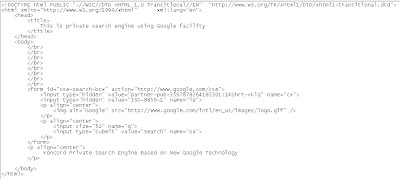
Following is the most essential part of the HTML. Save it as HTML format and replace “<“ with “<” since blogspot.com using HTML and it is not possible to publish .
<html>
<body>
<form id="cse-search-box" action="http://www.google.com/cse">
<input type="hidden" value="partner-pub-3597878264183301:140hrt-vklq" name="cx">
<input size="50" name="q">
<input type="submit" value="Search" name="sa">
</form>
</body>
</html>
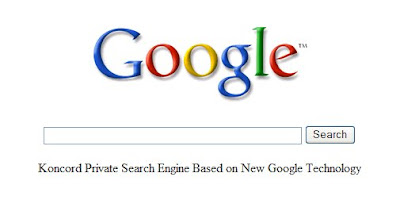
That is what looks like:
http://www.google.com/coop/docs/cse/resultsxml.html
<!DOCTYPE html PUBLIC "-//W3C//DTD XHTML 1.0 Transitional//EN" "http://www.w3.org/TR/xhtml1/DTD/xhtml1-transitional.dtd">
<html xmlns="http://www.w3.org/1999/xhtml" xml:lang="en">
<head>
<title>
This is private search engine using Google facility
</title>
</head>
<body>
</br>
</br>
</br>
</br>
</br>
</br>
</br>
</br>
<form id="cse-search-box" action="http://www.google.com/cse">
<input type="hidden" value="partner-pub-3597878264183301:140hrt-vklq" name="cx">
<input type="hidden" value="ISO-8859-1" name="ie">
<p align="center">
<img alt="Google" src="http://www.google.com/intl/en_us/images/logo.gif" />
</p>
<p align="center">
<input size="50" name="q">
<input type="submit" value="Search" name="sa">
</p>
</form>
<p align="center">
Koncord Private Search Engine Based on New Google Technology
</p>
</body>
</html>

Following is the most essential part of the HTML. Save it as HTML format and replace “<“ with “<” since blogspot.com using HTML and it is not possible to publish .
<html>
<body>
<form id="cse-search-box" action="http://www.google.com/cse">
<input type="hidden" value="partner-pub-3597878264183301:140hrt-vklq" name="cx">
<input size="50" name="q">
<input type="submit" value="Search" name="sa">
</form>
</body>
</html>
That is what looks like:

http://www.google.com/coop/docs/cse/resultsxml.html
Subscribe to:
Posts (Atom)

 Posts
Posts

