First of all, the dynamic SQL is not part of the stored procedure, but constitutes its own scope. So, it is a independent thread. Your task indeed is to pass the bind variable and/or parameter into that thread and retrieve the result back to your stored procedure.
There are two ways to invoke dynamic SQL, EXEC sp_executesql and EXEC(). EXEC() is simple and useful when SQL Server version is older than 2005. Since EXEC only permits string literals and string variables to be concatenated and not arbitrary expressions, and since you cannot use parameters, you cannot as easily get values out from EXEC(). Let us make it easier: Never use EXEC() in stored procedure. Let DBA use it for their tasks.
In EXEC sp_executesql, the first built-in parameter @stmt is the SQL query statement in string. It is best to declare it as NVARCHAR datatype. So does for the second built-in parameter @params.
If your own parameter is of column name and table name, please use this way: quotename(@column_or_table_name). Else, it won't work. By doing this, you indeed is to embed column name and table name as bind variable into the SQL script. It thus no longer the parameters of built-in stored procedure sp_executesql. So, please declare it outside the sp_executesql, and do not include it in the built-in parameter @params.
To get the query result out from the sp_executesql, in your SQL query statement, the following SELECT style is necessary:
SET @sqlStatement = 'SELECT @avgResult = AVG(' + quotename(@Column_Name) + ' ) FROM Tab_Name'
In addition, your own parameter for sp_executesql needs to be declared as OUTPUT.
After first two built-in parameters for sp_executesql, you will need to assign values to your own parameters for sp_executesql.
Okey, here is an example:
DECLARE @result INT
DECLARE @EachColumn VARCHAR(30)
DECLARE curs CURSOR FOR
SELECT COLUMN_NAME
FROM INFORMATION_SCHEMA.COLUMNS
WHERE TABLE_NAME = 'Temp_Transform_Result'
OPEN curs
FETCH NEXT FROM curs INTO @EachColumn
WHILE @@FETCH_STATUS = 0
BEGIN
DECLARE @exeString NVARCHAR(2000)
SET @exeString = ' SELECT @result = CONVERT(INT, AVG(' + quotename(@EachColumn) + '))
FROM Temp_Transform_Result
'
EXEC sp_executesql @exeString
, N'@result INT OUTPUT'
, @result OUTPUT
SET @exeString = ' INSERT INTO Temp_Transform_Input
VALUES ( ''IQM''
, @EachColumn
, @result
)
'
EXEC sp_executesql @exeString
, N'@EachColumn VARCHAR(30)
,@result INT
'
, @EachColumn = @EachColumn
, @result = @result
FETCH NEXT FROM curs INTO @EachColumn
END
CLOSE curs
DEALLOCATE curs
In first sp_executesql, @EachColumn is an embed bind variable rather than parameters. On contrast, in second sp_executesql, it is parameter. You may note, same parameter names used for sp_executesql and outsider stored procedure. So you see
, @EachColumn = @EachColumn
, @result = @result
The left hand side is parameter for sp_executesql, and the right hand side is the variable for stored procedure.
http://www.sommarskog.se/dynamic_sql.html
Showing posts with label Bind Variable. Show all posts
Showing posts with label Bind Variable. Show all posts

Error Message: The SELECT item identified by the ORDER BY number 1 contains a variable as part of the expression identifying a column position...
This SQL Server full error message is: "The SELECT item identified by the ORDER BY number 1 contains a variable as part of the expression identifying a column position. Variables are only allowed when ordering by an expression referencing a column name."
It happens when a bind variable is placed in ORDER BY clause. For dynamic SQL, the solution is Database Engine Stored Procedures sp_executesql. For example:
Your failed original statement:
SET @stddev = SELECT STDEVP(@EachColumn)
FROM Temp_IQM_Input
ORDER BY @EachColumn
The solution:
DECLARE @stddevString NVARCHAR(1000)
SET @stddevString = ' SELECT @out = STDEVP(@para) '
+ ' FROM Temp_IQM_Input '
+ ' ORDER BY @para '
DECLARE @stddev INT
EXECUTE sp_executesql @stddevString
, N'@para VARCHAR(32), @out INT OUTPUT'
, @para = @EachColumn
, @out = @stddev OUTPUT
;
For sp_executesql statement, the 1st line is the sql query in string, 2nd line to define the bind variables, if the parameter used for output, it needs to be stated. The rest lines are for variables assignments.
It is painful because there are too many WIP parameters; but it is the way.
It happens when a bind variable is placed in ORDER BY clause. For dynamic SQL, the solution is Database Engine Stored Procedures sp_executesql. For example:
Your failed original statement:
SET @stddev = SELECT STDEVP(@EachColumn)
FROM Temp_IQM_Input
ORDER BY @EachColumn
The solution:
DECLARE @stddevString NVARCHAR(1000)
SET @stddevString = ' SELECT @out = STDEVP(@para) '
+ ' FROM Temp_IQM_Input '
+ ' ORDER BY @para '
DECLARE @stddev INT
EXECUTE sp_executesql @stddevString
, N'@para VARCHAR(32), @out INT OUTPUT'
, @para = @EachColumn
, @out = @stddev OUTPUT
;
For sp_executesql statement, the 1st line is the sql query in string, 2nd line to define the bind variables, if the parameter used for output, it needs to be stated. The rest lines are for variables assignments.
It is painful because there are too many WIP parameters; but it is the way.
Max Length for Varchar Datatype Variable in T-SQL
There is a limit on how long a varchar datatype variable can be. It is 8,000. It obviously not enough since this kind of variable generally used dynamical SQL, especially when use with loop statement to add up with the query statement.
The solution? Don't concatenate it. Instead, execute it often and save into a WIP temporary tables. Sure, you would need to programmatically delete these temporary tables at the end of your procedure.
http://www.fotia.co.uk/fotia/DY.13.VarCharMax.aspx
The solution? Don't concatenate it. Instead, execute it often and save into a WIP temporary tables. Sure, you would need to programmatically delete these temporary tables at the end of your procedure.
http://www.fotia.co.uk/fotia/DY.13.VarCharMax.aspx
Issues In Multidimensional Array in JavaScript
Multidimensional array in JavaScript is treated as object, so it would be a problem when it works with dynamic HTML and Ajax. Since the reference points to the multidimensional array needs to be closely working with string, it is hard to program when should such reference being instantiated, that is presenting the whole body of the array rather than the reference itself. This issue becomes very serious when parameter management gets involved. Indeed, both bind variable and parameter management are essential for dynamic HTML.
If a string used as reference to be passed between functions, another issue may be occurred: hard to convert it back to reference. In some cases eval() function can be used to achieve this goal, however, it won't be able to work with multidimensional array.
The solution is using JSON datatype to represent the multidimensional array. In addition, it is suggested to convert it into string before being composed into bind variable or get involved with parameter management.
http://koncordpartners.blogspot.com/2010/08/parameter-management.html
If a string used as reference to be passed between functions, another issue may be occurred: hard to convert it back to reference. In some cases eval() function can be used to achieve this goal, however, it won't be able to work with multidimensional array.
The solution is using JSON datatype to represent the multidimensional array. In addition, it is suggested to convert it into string before being composed into bind variable or get involved with parameter management.
http://koncordpartners.blogspot.com/2010/08/parameter-management.html
iFrame Height Issue
Changing height of iFrame from JavaScript function becomes painful task in new versions of both IE and Firefox. However, if one uses iFrame, adjusting its height to fit its contents is essential. The problem is the height of content is unknown when dramatic feeding required. The “orthodox” method to accomplish this task is to open iFrame with any height first, then adjust it on onLoad event. Width is less painful because for those iFrame to fit complete screen width, width=“100%” can be defined when iFrame is defined.
Basic idea of this “orthodox” approach includes two steps, detect the correct height and resize to it.
Detecting methods include:
- document.documentElement.clientHeight
- contentWindow.document.body.scrollHeight
Resize method is:
- document.getElementById('myIframe').style.height = newHeight
Basically, this approach does not work. There are several problems around it, such as assignment to .style.height does not work in Firefox. More serious problem is contentWindow.document.body.scrollHeight will return permission denial error message if host page and iFrame content page are not in the same domain; more precisely, the scheme, hostname and port match.
Another approach is to find the correct height before opening the iFrame. It is hard to detect the height of page to be inside of iFrame. However, since iFrame can have its own scroll bar, it may not be necessary to detect content’s height. The best approach might be to find available screen height of user after your title head. Following methods have been tested in Firefox and IE:
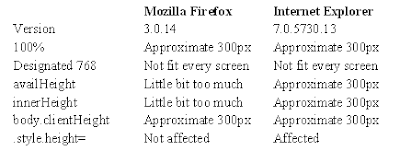
It appears Internet Explorer does not response to any of detections.
Following is the codes to apply this approach:
Codes in head:
‹script type="text/javascript"›
var url = "http://www.google.com/" // URL for your iFrame.
var titleHeight = 240;
var frameHeight = Math.max((screen.availHeight ? (screen.availHeight-titleHeight) : (window.innerHeight ? (window.innerHeight-titleHeight) : document.body.clientHeight)), 768);
window.document.onload = function {document.getElementById('linkIframe').style.height = frameHeight};
‹/script›
Codes in body:
‹script type="text/javascript"›
document.write('‹iframe id="linkIframe" width="100%" height="' + frameHeight + '" src="' + url + '" name="content"›‹/iframe›');
‹/script›
Basic idea of this “orthodox” approach includes two steps, detect the correct height and resize to it.
Detecting methods include:
- document.documentElement.clientHeight
- contentWindow.document.body.scrollHeight
Resize method is:
- document.getElementById('myIframe').style.height = newHeight
Basically, this approach does not work. There are several problems around it, such as assignment to .style.height does not work in Firefox. More serious problem is contentWindow.document.body.scrollHeight will return permission denial error message if host page and iFrame content page are not in the same domain; more precisely, the scheme, hostname and port match.
Another approach is to find the correct height before opening the iFrame. It is hard to detect the height of page to be inside of iFrame. However, since iFrame can have its own scroll bar, it may not be necessary to detect content’s height. The best approach might be to find available screen height of user after your title head. Following methods have been tested in Firefox and IE:

It appears Internet Explorer does not response to any of detections.
Following is the codes to apply this approach:
Codes in head:
‹script type="text/javascript"›
var url = "http://www.google.com/" // URL for your iFrame.
var titleHeight = 240;
var frameHeight = Math.max((screen.availHeight ? (screen.availHeight-titleHeight) : (window.innerHeight ? (window.innerHeight-titleHeight) : document.body.clientHeight)), 768);
window.document.onload = function {document.getElementById('linkIframe').style.height = frameHeight};
‹/script›
Codes in body:
‹script type="text/javascript"›
document.write('‹iframe id="linkIframe" width="100%" height="' + frameHeight + '" src="' + url + '" name="content"›‹/iframe›');
‹/script›
Subscribe to:
Posts (Atom)

 Posts
Posts

