Optional parameters In SSRS means if parameters have been selected, it would be passed back to SQL query as condition in WHERE clause, and when no parameter(s) have been selected, the WHERE condition should be not in use. Dynamic SQL is not the best solution. Following solution is much better:
SELECT Col_A
, Col_B
FROM Tab
WHERE (Col_A=@para_A OR @para_A IS NULL)
AND (Col_B=@para_B OR @para_B IS NULL)
What make life harder is when parameters are selected, but due to lack of records, the result is nil? These would be happened often when multiple parameters get involved. Depends on situations, you may wish to abandon that condition completely. So, the real issue is not if you have option to select a particular parameter, it is if you have selected that parameter but it turns out nil result and you need to abandon it after this discovery.
There is no programmatic solution so far. However, following approach may help:
1, Limit the number of parameters, because you will need to combine them in matrix. Too many parameters will increase the task load exponentially.
2, Classify parameters into hierarchy.
3, Write queries for each combination case of the parameters. Hierarchical structure of parameters will help a lot.
4, From low position in hierarchy to pick up the best available result amongst the results generated from above queries. Following is an example to do this procedure:
; SET @Stopper = 0
; IF 0 = @Stopper
BEGIN
SELECT @result = SUM(CASE WHEN Hierarchy = 'Level_1' AND Result_From_Set IS NOT NULL THEN Result_From_Set ELSE 0 END)
FROM Tab
IF @result <> 0 SET @Stopper = 1
END
; IF 0 = @Stopper
BEGIN
SELECT @result = SUM(CASE WHEN Hierarchy = 'Level_2' AND Result_From_Set IS NOT NULL THEN Result_From_Set ELSE 0 END)
FROM Tab
IF @result <> 0 SET @Stopper = 1
END
...
What you need to do next is in SSRS to enable the optional parameters. While you have made it possible to accept the NULL value in your back-end queries, by default the report interface of SSRS cannot be flagged out the parameters. The users would have no choice but to select parameters. In this case, include NULL value record for your parameter data set:
SELECT NULL AS Id
, 'Unknown' AS Name
UNION
SELECT DISTINCT Id
, Name
FROM Tab
If you have problem on how to position this NULL value record, please refer to following article:
Special Function of ORDER BY Clause in T-SQL
Next, in Report Parameters window of SSRS, make sure the "Allow null value" option has been selected for this particular parameter.
Done.
http://bloggingabout.net/blogs/egiardina/archive/2007/06/26/sql-server-reporting-services-optional-parameters.aspx
Showing posts with label Null. Show all posts
Showing posts with label Null. Show all posts

Introduction To A New Array Type: Key-only Array
By Howard Stone (2010 October 2)
In general, there are two types of array, indexed array and associative array. The array introduced in this article does contain keys only. So far, the best use of key-only array is to represent the dataset in table data type. Let us start from a table in database which contains a dataset as a result of SELECT query.
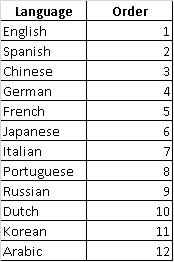 A normalized table usually has less group relationship between records, that is more to stateless. For this nature, the applications of normalized table tend to deal with a single record once at a time. On contrast, the denormalized table usually has group relationship between records, which may generated from SELECT query that includes GROUP BY clause. This kind of dataset then would be process bulky for sake of relationship between each rows. The major usages include feet data to option group, list box, etc.
The key-only array in Javascript, for instance, for above table would be:
; var arr = new Array(13)
; arr['Language'] = new Array(1)
; arr['Language']['Order'] = 1
; arr['English'] = new Array(1)
; arr['English']['1'] = 0
; arr['Spanish'] = new Array(1)
; arr['Spanish']['2'] = 0
...
; arr['Arabic'] = new Array(1)
; arr['Arabic']['12'] = 0
Actually, this is not so-called new type, it is just a multidimensional associative array, for which some values become keys. Please note, the values of 1 or 0 here are useless. To having values is indeed a compromised setting to enable current design of languages to parse the key-only array without any change. However, the concept of key and value changed since. The container of full information is the keys. The values here thus can be used as flag at programmer's discretion.
Why such? Because it enables to access selected information simply through hierarchical traverse by using keys without complicated parse process. The key-only array does naturally contain the internal relationship between rows, which was generated by original SELECT statement in SQL query. In addition, in comparison with traditional arrays, this would use less codes.
Please note, the key-only array can include or exclude the title of the columns in original table. If any field is null, please turn it into string 'NULL' first. It would be then accessible in key-only array. Please use bracket '' for all keys because the fields in original table may contain whitespace, which would cause problems when key-only array being used in AJAX or other Dynamic HTML.
Let us see how to use this key-only array. When calling it at higher dimension, such as arr['English'] would assign a set of new sub arrays that contain all cells after dimension "English". To get list of the dimension immediately after "English", which is often used for cascade triggering, following codes can be used:
; var immediateList = new array()
; for (key in arr["English"]) immediateList.push(key)
In JSON, it would be:
; var arr =
{"Language":{"Order":1}
,"English":{"1":0}
,"Spanish":{"2":0}
...
,"Arabic":{"12":0}
}
Only at very root, there is array bracket []. All rest are in brackets {}. To access sub arrays started from "English" or "1" after "English" assume there is further sub arrays:
arr["English"]
arr["English"]["1"]
If "1" is something other than numeric, it can be called:
arr["English"].something
To access keys at next dimension after "English":
; var immediateList = new array()
; for (key in arr["English"]) immediateList.push(key)
Summary:
1. Key-only array can use all existing functionalities of indexed array and associative array.
2. Since the information is key itself, there is no need to do any value search. It thus achieves directly random access without traverse.
3. It makes contained relationship information between original rows usable.
4. It uses less code.
5. It can be in JSON format too.
Special notes:
1. Since values are not in use, it can be used to represent last column. However, it is not recommended because it would require special treatment for leave of key tree.
2. Replace null with string 'NULL" at SQL query if the data source is database.
3. Always use bracket to make sure all keys are in string datatype.
4. When calling key-only array, always use array calling method rather than identifier calling method, that is arr["English"]["something"] instead of arr.English.something. This is to avoid possible error because in some languages like JavaScript identifiers can't begin with a numeral.
In general, there are two types of array, indexed array and associative array. The array introduced in this article does contain keys only. So far, the best use of key-only array is to represent the dataset in table data type. Let us start from a table in database which contains a dataset as a result of SELECT query.
 A normalized table usually has less group relationship between records, that is more to stateless. For this nature, the applications of normalized table tend to deal with a single record once at a time. On contrast, the denormalized table usually has group relationship between records, which may generated from SELECT query that includes GROUP BY clause. This kind of dataset then would be process bulky for sake of relationship between each rows. The major usages include feet data to option group, list box, etc.
The key-only array in Javascript, for instance, for above table would be:
; var arr = new Array(13)
; arr['Language'] = new Array(1)
; arr['Language']['Order'] = 1
; arr['English'] = new Array(1)
; arr['English']['1'] = 0
; arr['Spanish'] = new Array(1)
; arr['Spanish']['2'] = 0
...
; arr['Arabic'] = new Array(1)
; arr['Arabic']['12'] = 0
Actually, this is not so-called new type, it is just a multidimensional associative array, for which some values become keys. Please note, the values of 1 or 0 here are useless. To having values is indeed a compromised setting to enable current design of languages to parse the key-only array without any change. However, the concept of key and value changed since. The container of full information is the keys. The values here thus can be used as flag at programmer's discretion.
Why such? Because it enables to access selected information simply through hierarchical traverse by using keys without complicated parse process. The key-only array does naturally contain the internal relationship between rows, which was generated by original SELECT statement in SQL query. In addition, in comparison with traditional arrays, this would use less codes.
Please note, the key-only array can include or exclude the title of the columns in original table. If any field is null, please turn it into string 'NULL' first. It would be then accessible in key-only array. Please use bracket '' for all keys because the fields in original table may contain whitespace, which would cause problems when key-only array being used in AJAX or other Dynamic HTML.
Let us see how to use this key-only array. When calling it at higher dimension, such as arr['English'] would assign a set of new sub arrays that contain all cells after dimension "English". To get list of the dimension immediately after "English", which is often used for cascade triggering, following codes can be used:
; var immediateList = new array()
; for (key in arr["English"]) immediateList.push(key)
In JSON, it would be:
; var arr =
{"Language":{"Order":1}
,"English":{"1":0}
,"Spanish":{"2":0}
...
,"Arabic":{"12":0}
}
Only at very root, there is array bracket []. All rest are in brackets {}. To access sub arrays started from "English" or "1" after "English" assume there is further sub arrays:
arr["English"]
arr["English"]["1"]
If "1" is something other than numeric, it can be called:
arr["English"].something
To access keys at next dimension after "English":
; var immediateList = new array()
; for (key in arr["English"]) immediateList.push(key)
Summary:
1. Key-only array can use all existing functionalities of indexed array and associative array.
2. Since the information is key itself, there is no need to do any value search. It thus achieves directly random access without traverse.
3. It makes contained relationship information between original rows usable.
4. It uses less code.
5. It can be in JSON format too.
Special notes:
1. Since values are not in use, it can be used to represent last column. However, it is not recommended because it would require special treatment for leave of key tree.
2. Replace null with string 'NULL" at SQL query if the data source is database.
3. Always use bracket to make sure all keys are in string datatype.
4. When calling key-only array, always use array calling method rather than identifier calling method, that is arr["English"]["something"] instead of arr.English.something. This is to avoid possible error because in some languages like JavaScript identifiers can't begin with a numeral.
is_numeric() And is_int() in PHP
Both is_numeric() and is_int() will return neither TRUE nor FALSE, but null if parameter is null. Logically, it is correct. Practically, it does make these two functions next to useless. Because we human being would never believe null is numeric. For human being, it is obvious...
To make it useful, we would first consider if parameter is null or not, then if it is numeric. Here is simple way to test these three situations once for all:
if (0!=strlen(trim(@$para)) && is_numeric(@$para)) {...};
To make it useful, we would first consider if parameter is null or not, then if it is numeric. Here is simple way to test these three situations once for all:
if (0!=strlen(trim(@$para)) && is_numeric(@$para)) {...};
Trouble with Internet Explorer
The purpose of this article is to establish an uniform convention to deal with a very special issue of IE. It is for sure without this convention, websites would still run with or without problem. The issue is when IE passing null value from JavaScript to PHP, null value becomes string "null". If there is a possibility the user input could be "null", such as using "null" as login name or password, there is no way for PHP to detect which "null" is null and which "null" is input "null".
So, the accurate solution is never let JavaScript passing null to PHP, but using '' instead. It sounds easy; but JavaScript can generate null value without your knowledge. That is, if a parameter passing through a function to feed a form, when original parameter is undefined, eventually that undefined would be become string "null" or string "undefined" at the end of PHP. So, you would need to deal with every form input by special arrangement as follows:
; document.theForm.theInputItem.value = (parameter) ? parameter : ''
Then, to test if it is valid in JavaScript would be changed to:
; if (''!=parameter) {...}
At PHP end, it is relatively easy to detect if it is a valid input:
if (0!=strlen(trim(@$_POST["theInputItem"]))) {...};
However, for numeric data, it is not suitable to use '' instead null. It is still suggested to code as usual. The only difference is at PHP end:
if (0!=strlen(trim(@$_POST["theInputItem"])) && is_numeric(@$_POST["theInputItem"])) {...};
http://koncordpartners.blogspot.com/2009/12/test-various-nothings-in-php.html
So, the accurate solution is never let JavaScript passing null to PHP, but using '' instead. It sounds easy; but JavaScript can generate null value without your knowledge. That is, if a parameter passing through a function to feed a form, when original parameter is undefined, eventually that undefined would be become string "null" or string "undefined" at the end of PHP. So, you would need to deal with every form input by special arrangement as follows:
; document.theForm.theInputItem.value = (parameter) ? parameter : ''
Then, to test if it is valid in JavaScript would be changed to:
; if (''!=parameter) {...}
At PHP end, it is relatively easy to detect if it is a valid input:
if (0!=strlen(trim(@$_POST["theInputItem"]))) {...};
However, for numeric data, it is not suitable to use '' instead null. It is still suggested to code as usual. The only difference is at PHP end:
if (0!=strlen(trim(@$_POST["theInputItem"])) && is_numeric(@$_POST["theInputItem"])) {...};
http://koncordpartners.blogspot.com/2009/12/test-various-nothings-in-php.html
Test Various “Nothings” in PHP
Following php codes is to test six different “nothing”variables together with popular functions, plus number 1 as control.
‹?php
$undefinedVar;
$nullVar = null;
$strEmpty = "";
$strChanged = "initial value";
$numZero = 0;
$numChanged = 1;
$numOne = 1;
$strChanged = null;
$numChanged = null;
echo "‹br/›11. undefinedVar: (".$undefinedVar.")";
echo "‹br/›12. nullVar: (".$nullVar.")";
echo "‹br/›13. strEmpty: (".$strEmpty.")";
echo "‹br/›14. strChanged: (".$strChanged.")";
echo "‹br/›15. numZero: (".$numZero.")";
echo "‹br/›16. numChanged: (".$numChanged.")";
echo "‹br/›21. is_null-undefinedVar: (".is_null($undefinedVar).")";
echo "‹br/›22. is_null-nullVar: (".is_null($nullVar).")";
echo "‹br/›23. is_null-strEmpty: (".is_null($strEmpty).")";
echo "‹br/›24. is_null-strChanged: (".is_null($strChanged).")";
echo "‹br/›25. is_null-numZero: (".is_null($numZero).")";
echo "‹br/›26. is_null-numChanged: (".is_null($numChanged).")";
echo "‹br/›31. isset-undefinedVar: (".isset($undefinedVar).")";
echo "‹br/›32. isset-nullVar: (".isset($nullVar).")";
echo "‹br/›33. isset-strEmpty: (".isset($strEmpty).")";
echo "‹br/›34. isset-strChanged: (".isset($strChanged).")";
echo "‹br/›35. isset-numZero: (".isset($numZero).")";
echo "‹br/›36. isset-numChanged: (".isset($numChanged).")";
echo "‹br/›47. TRUE: (".TRUE.")";
echo "‹br/›48. FALSE: (".FALSE.")";
echo "‹br/›51. empty-undefinedVar: (".empty($undefinedVar).")";
echo "‹br/›52. empty-nullVar: (".empty($nullVar).")";
echo "‹br/›53. empty-strEmpty: (".empty($strEmpty).")";
echo "‹br/›54. empty-strChanged: (".empty($strChanged).")";
echo "‹br/›55. empty-numZero: (".empty($numZero).")";
echo "‹br/›56. empty-numChanged: (".empty($numChanged).")";
echo "‹br/›57. empty-numOne: (".empty($numOne).")";
echo "‹br/›61. defined-undefinedVar: (".defined($undefinedVar).")";
echo "‹br/›62. defined-nullVar: (".defined($nullVar).")";
echo "‹br/›63. defined-strEmpty: (".defined($strEmpty).")";
echo "‹br/›64. defined-strChanged: (".defined($strChanged).")";
echo "‹br/›65. defined-numZero: (".defined($numZero).")";
echo "‹br/›66. defined-numChanged: (".defined($numChanged).")";
echo "‹br/›71. strlen-trim-undefinedVar: (".strlen(trim($undefinedVar)).")";
echo "‹br/›72. strlen-trim-nullVar: (".strlen(trim($nullVar)).")";
echo "‹br/›73. strlen-trim-strEmpty: (".strlen(trim($strEmpty)).")";
echo "‹br/›74. strlen-trim-strChanged: (".strlen(trim($strChanged)).")";
echo "‹br/›75. strlen-trim-numZero: (".strlen(trim($numZero)).")";
echo "‹br/›76. strlen-trim-numChanged: (".strlen(trim($numChanged)).")";
?›
unset() does not work for any one of them. Therefore, it had been excluded.
Test results in both Firefox and IE are identical, as follows:
11. undefinedVar: ()
12. nullVar: ()
13. strEmpty: ()
14. strChanged: ()
15. numZero: (0)
16. numChanged: ()
21. is_null-undefinedVar: (1)
22. is_null-nullVar: (1)
23. is_null-strEmpty: ()
24. is_null-strChanged: (1)
25. is_null-numZero: ()
26. is_null-numChanged: (1)
31. isset-undefinedVar: ()
32. isset-nullVar: ()
33. isset-strEmpty: (1)
34. isset-strChanged: ()
35. isset-numZero: (1)
36. isset-numChanged: ()
47. TRUE: (1)
48. FALSE: ()
51. empty-undefinedVar: (1)
52. empty-nullVar: (1)
53. empty-strEmpty: (1)
54. empty-strChanged: (1)
55. empty-numZero: (1)
56. empty-numChanged: (1)
57. empty-numOne: ()
61. defined-undefinedVar: ()
62. defined-nullVar: ()
63. defined-strEmpty: ()
64. defined-strChanged: ()
65. defined-numZero: ()
66. defined-numChanged: ()
71. strlen-trim-undefinedVar: (0)
72. strlen-trim-nullVar: (0)
73. strlen-trim-strEmpty: (0)
74. strlen-trim-strChanged: (0)
75. strlen-trim-numZero: (1)
76. strlen-trim-numChanged: (0)
Observed, included but not limited to this test:
1. Results in Firefox and IE are exactly same. However, if an null variable passed from JavaScript to PHP, in IE, it would be shown as a string "null". In a real case scenario, a variable is to pass from form feeding in HTML/JavaScript to PHP. However, it had only be assigned with value “null”. It supposes an integer data type. Unfortunately, in is_null() in PHP, it results not null, while echo shows “null” in IE and nothing in Firefox.
2. unset() does not work at all for all of them.
3. is_null() works fine. It however regards empty string as not null, which should be.
4. isset() works fine. It regards empty string as set.
5. is_null() is just opposite to isset().
6. empty() works for all, including regarding number 0 as empty.
7. defined() is to detect if a constant string exists, which does works fine here, since no constant string here.
8. strlen(trim()) does work fine except number 0, which should be.
Conclusion:
First of all, never use null in JavaScript where it supposed to be a string. Use '' instead. This is because in IE, when JavaScript passes string to PHP, null would become 'null'.
1. If one want to include everything, null, empty string, number 0, and even string “0”, the best approach is to use if(empty($var)).
2. If one wants to include null and empty string and exclude number 0, if(0==strlen(trim($var)) might be best approach. However, this approach is unable to detect the string "null".
3. If one wants to include null and number 0 and exclude empty string, the best approach maybe if(is_null($var) || 0==$var).
4. If one wants to only include null and exclude empty string and number 0, the best approach is if(is_null($var)). However, since both JavaScript and PHP does not tell the data type when declare a variable, it somehow easily to be mixed up the undefined variable or null variable with empty string. It is therefore suggested extra caution shall be applied to exclude empty string.
5. In most case people dealing with null would include undefined variable, null variable, empty string in JavaScript and PHP. For special case mentioned above for IE, it would includes string "null" as well, which isn't covered by Conclustion 2. So, the possible most save approach is put two together:
if(0==strlen(trim($var)) || "null"==$var)
6. To deal with undefined array, please refer to http://koncordpartners.blogspot.com/2009/12/number-of-elements-of-array.html.
http://ca2.php.net/manual/en/function.empty.php
‹?php
$undefinedVar;
$nullVar = null;
$strEmpty = "";
$strChanged = "initial value";
$numZero = 0;
$numChanged = 1;
$numOne = 1;
$strChanged = null;
$numChanged = null;
echo "‹br/›11. undefinedVar: (".$undefinedVar.")";
echo "‹br/›12. nullVar: (".$nullVar.")";
echo "‹br/›13. strEmpty: (".$strEmpty.")";
echo "‹br/›14. strChanged: (".$strChanged.")";
echo "‹br/›15. numZero: (".$numZero.")";
echo "‹br/›16. numChanged: (".$numChanged.")";
echo "‹br/›21. is_null-undefinedVar: (".is_null($undefinedVar).")";
echo "‹br/›22. is_null-nullVar: (".is_null($nullVar).")";
echo "‹br/›23. is_null-strEmpty: (".is_null($strEmpty).")";
echo "‹br/›24. is_null-strChanged: (".is_null($strChanged).")";
echo "‹br/›25. is_null-numZero: (".is_null($numZero).")";
echo "‹br/›26. is_null-numChanged: (".is_null($numChanged).")";
echo "‹br/›31. isset-undefinedVar: (".isset($undefinedVar).")";
echo "‹br/›32. isset-nullVar: (".isset($nullVar).")";
echo "‹br/›33. isset-strEmpty: (".isset($strEmpty).")";
echo "‹br/›34. isset-strChanged: (".isset($strChanged).")";
echo "‹br/›35. isset-numZero: (".isset($numZero).")";
echo "‹br/›36. isset-numChanged: (".isset($numChanged).")";
echo "‹br/›47. TRUE: (".TRUE.")";
echo "‹br/›48. FALSE: (".FALSE.")";
echo "‹br/›51. empty-undefinedVar: (".empty($undefinedVar).")";
echo "‹br/›52. empty-nullVar: (".empty($nullVar).")";
echo "‹br/›53. empty-strEmpty: (".empty($strEmpty).")";
echo "‹br/›54. empty-strChanged: (".empty($strChanged).")";
echo "‹br/›55. empty-numZero: (".empty($numZero).")";
echo "‹br/›56. empty-numChanged: (".empty($numChanged).")";
echo "‹br/›57. empty-numOne: (".empty($numOne).")";
echo "‹br/›61. defined-undefinedVar: (".defined($undefinedVar).")";
echo "‹br/›62. defined-nullVar: (".defined($nullVar).")";
echo "‹br/›63. defined-strEmpty: (".defined($strEmpty).")";
echo "‹br/›64. defined-strChanged: (".defined($strChanged).")";
echo "‹br/›65. defined-numZero: (".defined($numZero).")";
echo "‹br/›66. defined-numChanged: (".defined($numChanged).")";
echo "‹br/›71. strlen-trim-undefinedVar: (".strlen(trim($undefinedVar)).")";
echo "‹br/›72. strlen-trim-nullVar: (".strlen(trim($nullVar)).")";
echo "‹br/›73. strlen-trim-strEmpty: (".strlen(trim($strEmpty)).")";
echo "‹br/›74. strlen-trim-strChanged: (".strlen(trim($strChanged)).")";
echo "‹br/›75. strlen-trim-numZero: (".strlen(trim($numZero)).")";
echo "‹br/›76. strlen-trim-numChanged: (".strlen(trim($numChanged)).")";
?›
unset() does not work for any one of them. Therefore, it had been excluded.
Test results in both Firefox and IE are identical, as follows:
11. undefinedVar: ()
12. nullVar: ()
13. strEmpty: ()
14. strChanged: ()
15. numZero: (0)
16. numChanged: ()
21. is_null-undefinedVar: (1)
22. is_null-nullVar: (1)
23. is_null-strEmpty: ()
24. is_null-strChanged: (1)
25. is_null-numZero: ()
26. is_null-numChanged: (1)
31. isset-undefinedVar: ()
32. isset-nullVar: ()
33. isset-strEmpty: (1)
34. isset-strChanged: ()
35. isset-numZero: (1)
36. isset-numChanged: ()
47. TRUE: (1)
48. FALSE: ()
51. empty-undefinedVar: (1)
52. empty-nullVar: (1)
53. empty-strEmpty: (1)
54. empty-strChanged: (1)
55. empty-numZero: (1)
56. empty-numChanged: (1)
57. empty-numOne: ()
61. defined-undefinedVar: ()
62. defined-nullVar: ()
63. defined-strEmpty: ()
64. defined-strChanged: ()
65. defined-numZero: ()
66. defined-numChanged: ()
71. strlen-trim-undefinedVar: (0)
72. strlen-trim-nullVar: (0)
73. strlen-trim-strEmpty: (0)
74. strlen-trim-strChanged: (0)
75. strlen-trim-numZero: (1)
76. strlen-trim-numChanged: (0)
Observed, included but not limited to this test:
1. Results in Firefox and IE are exactly same. However, if an null variable passed from JavaScript to PHP, in IE, it would be shown as a string "null". In a real case scenario, a variable is to pass from form feeding in HTML/JavaScript to PHP. However, it had only be assigned with value “null”. It supposes an integer data type. Unfortunately, in is_null() in PHP, it results not null, while echo shows “null” in IE and nothing in Firefox.
2. unset() does not work at all for all of them.
3. is_null() works fine. It however regards empty string as not null, which should be.
4. isset() works fine. It regards empty string as set.
5. is_null() is just opposite to isset().
6. empty() works for all, including regarding number 0 as empty.
7. defined() is to detect if a constant string exists, which does works fine here, since no constant string here.
8. strlen(trim()) does work fine except number 0, which should be.
Conclusion:
First of all, never use null in JavaScript where it supposed to be a string. Use '' instead. This is because in IE, when JavaScript passes string to PHP, null would become 'null'.
1. If one want to include everything, null, empty string, number 0, and even string “0”, the best approach is to use if(empty($var)).
2. If one wants to include null and empty string and exclude number 0, if(0==strlen(trim($var)) might be best approach. However, this approach is unable to detect the string "null".
3. If one wants to include null and number 0 and exclude empty string, the best approach maybe if(is_null($var) || 0==$var).
4. If one wants to only include null and exclude empty string and number 0, the best approach is if(is_null($var)). However, since both JavaScript and PHP does not tell the data type when declare a variable, it somehow easily to be mixed up the undefined variable or null variable with empty string. It is therefore suggested extra caution shall be applied to exclude empty string.
5. In most case people dealing with null would include undefined variable, null variable, empty string in JavaScript and PHP. For special case mentioned above for IE, it would includes string "null" as well, which isn't covered by Conclustion 2. So, the possible most save approach is put two together:
if(0==strlen(trim($var)) || "null"==$var)
6. To deal with undefined array, please refer to http://koncordpartners.blogspot.com/2009/12/number-of-elements-of-array.html.
http://ca2.php.net/manual/en/function.empty.php
Subscribe to:
Posts (Atom)

 Posts
Posts

